Case study · Service design · Healthcare · Department of Veterans Affairs · 2020–2021
Bringing virtual veteran care onto one platform
The VA set out to bring scheduling, pharmacy, nurse triage, and virtual clinic visits onto one Salesforce platform with a single veteran record, so information would stop getting lost between systems. The program serves millions of veterans and tens of thousands of staff. I joined as the only designer and led the research and design for the first release.
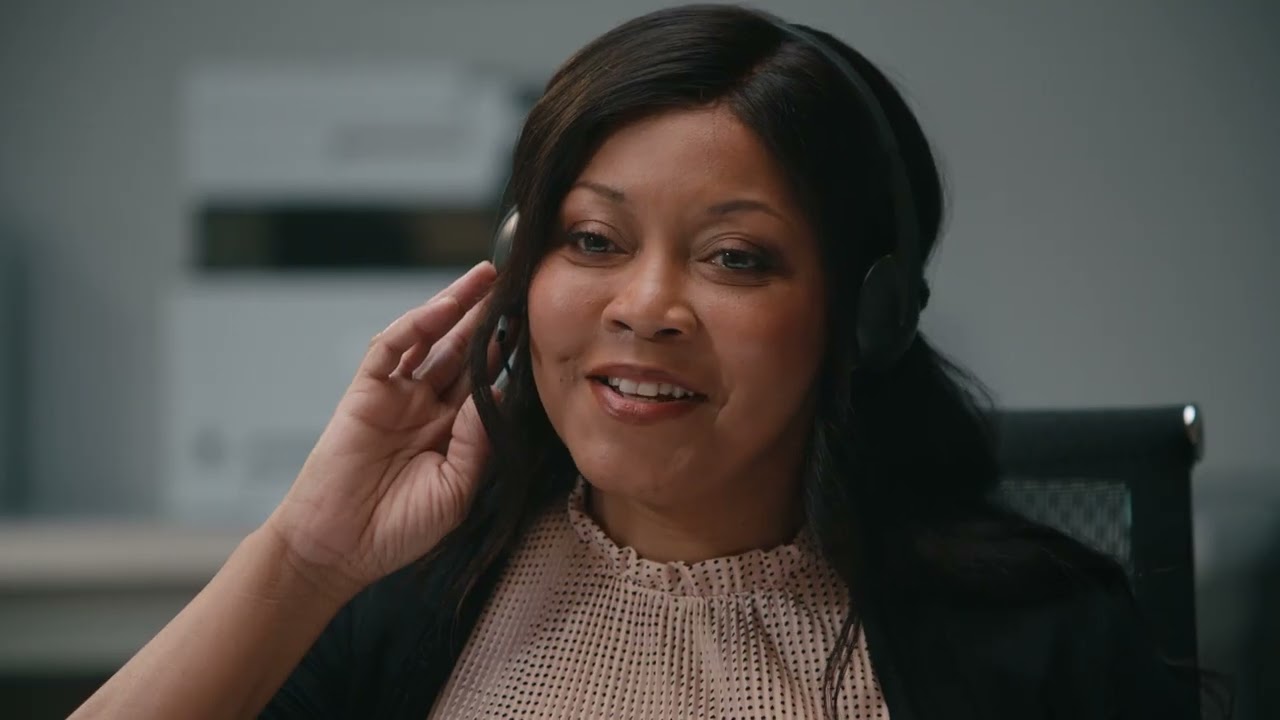
VA Health Connect, from the VA's own video. A still from the short video the VA published about the service in 2022. Click to watch it at the end of this page.
The problem
Scheduling, pharmacy, nurse triage, and virtual clinics each ran on separate systems, with no unified veteran record. Medical Support Assistants moved among 14 to 20 of them on a call, racing ten-minute timeouts, and when a handoff got dropped the veteran had to call back.
My role
Senior UX designer, and at first the only designer. I led research, service design, MVP prioritization, and Salesforce interaction design, then hired and onboarded a second designer.
What happened
The first release reached super-user training in August 2021 and went live after I'd moved to another company. It put the call record, the progress note, co-signing, ordering, and prescribing in one place, organized around one record per veteran. It did not replace every older system.
TeamTwo designers, business analysts, Salesforce developers ClientDepartment of Veterans Affairs, through Liberty IT Solutions (now part of Booz Allen Hamilton) ToolsFigma, Salesforce Lightning Design System
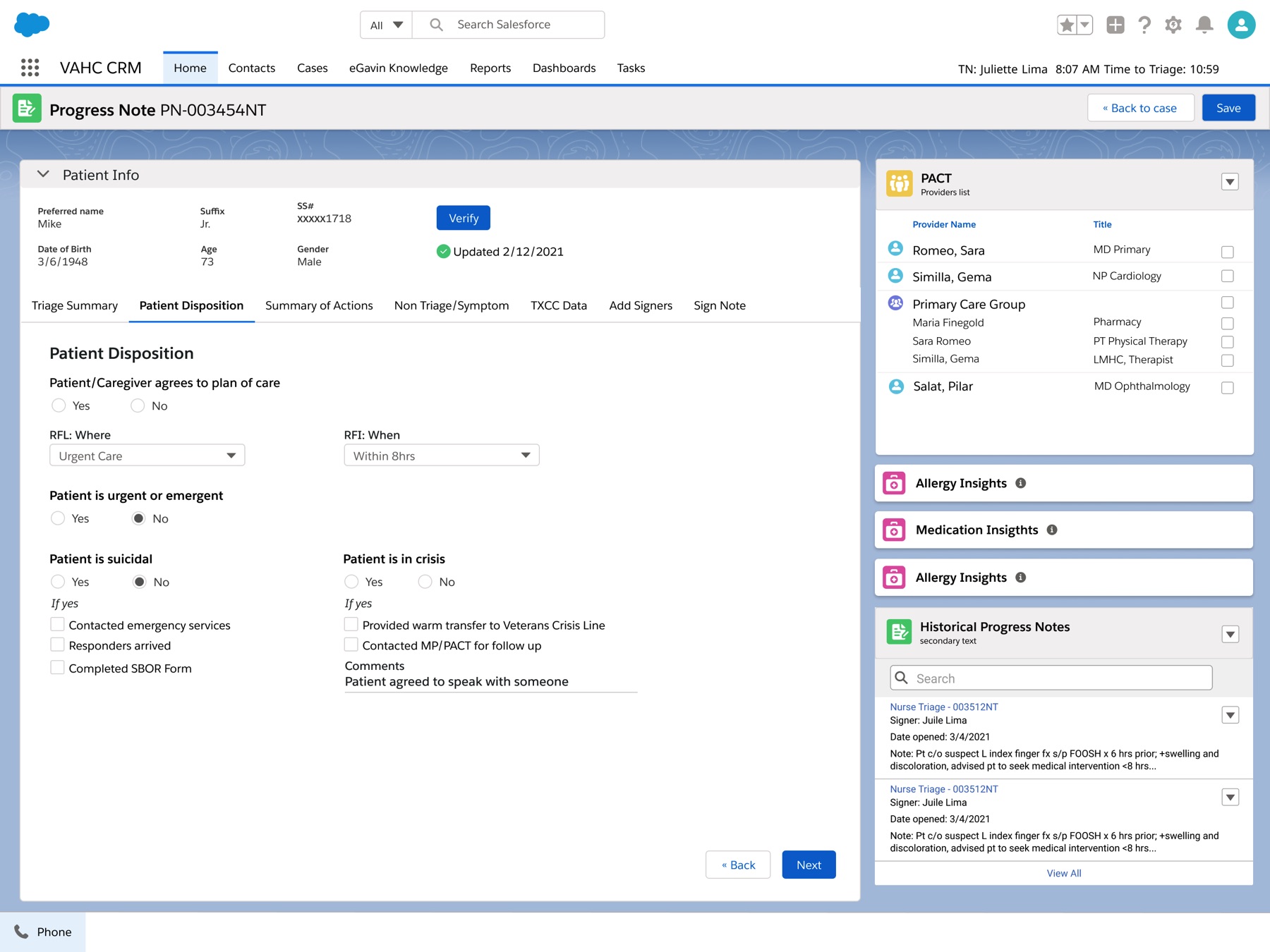
A triage nurse's progress note in the new CRM. The disposition questions sit in the middle. The veteran's care team and earlier notes stay visible on the right, so she isn't opening another program to find them. Patient data is fictional.
Research
The note that wasn't there
One veteran I interviewed lives outside cell coverage. To call the VA, he drives twenty minutes into town, parks, and waits on hold, often for another half hour.
He called to get physical therapy approved. The nurse said she would leave a note for his doctor, but when he made the trip again five days later, no note was there. The next week he called a third time. Still nothing. "The notes just disappear," he told me.
My first reaction was to be angry at whoever had answered the phone. Then I spent a few months with the people who answer the phone.
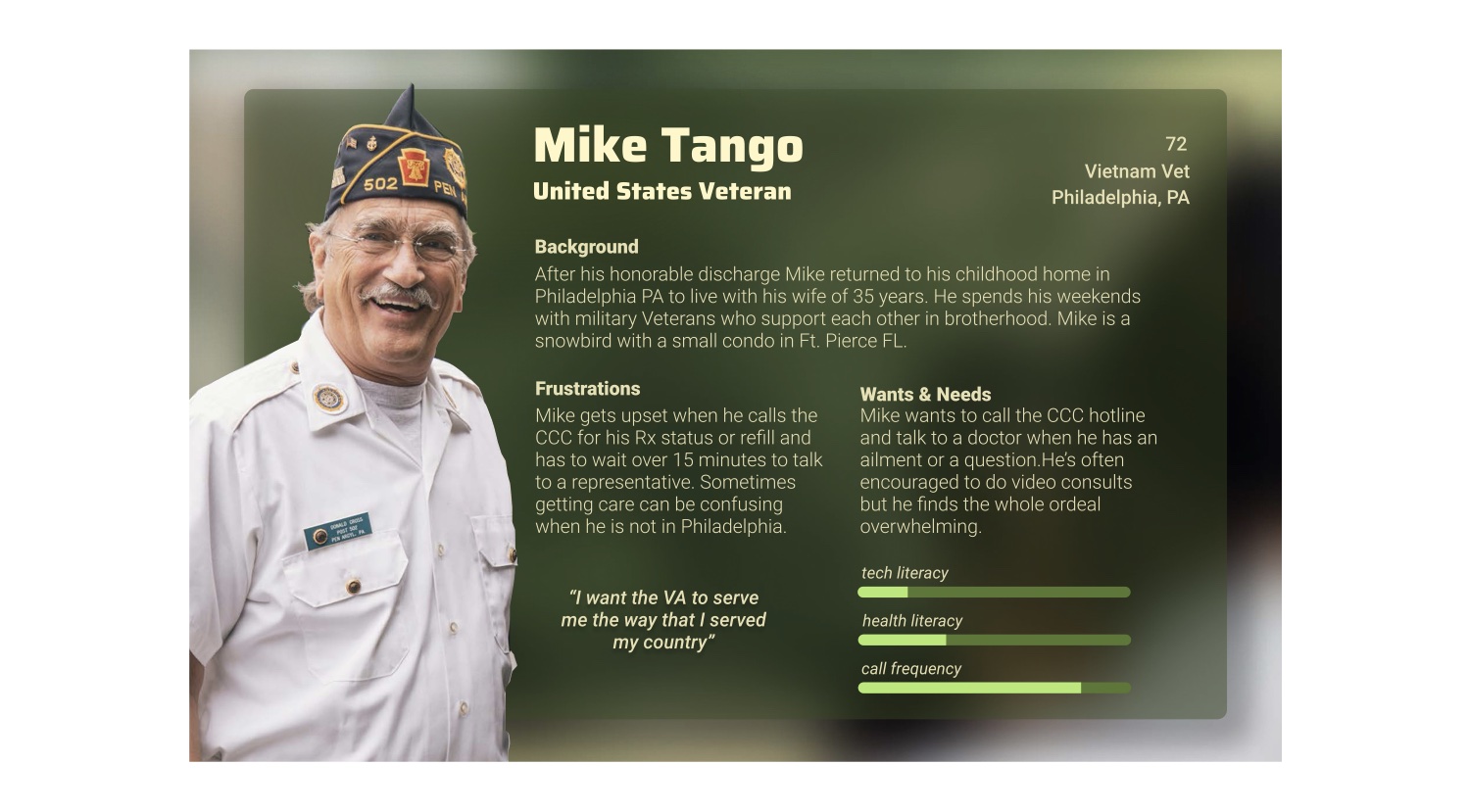
Mike Tango, 72, Vietnam veteran. One of six archetypes I built from the interviews, and the caller in every service map on this page.
Research
Thirty-five windows
I joined the VA's Clinical Contact Center modernization as its only designer. The program was moving the staff who answer veterans' calls onto one Salesforce CRM, and I had to work out what it needed to do for each of them. I ran more than sixteen interviews and sat with staff while they walked me through their calls. I also held workshops across regional networks, because each region had built its own way of doing the same job.
Access to users was limited, so I advocated with our team and the VA's product owners for a group of leads who did each of these jobs every day. They became our sounding board, and they connected us with the people on their teams who use the tools all day, not only the managers.
One scheduling lead covered seven medical centers, each with its own copy of the records system, the scheduling tool, the charting tool, and the triage tool. She kept about 35 windows open and told me she'd earned twelve grey hairs just keeping them from timing out. A triage nurse told me that after each triage she typed the whole thing again into the patient's chart, vitals included. One nurse rated her software "a 10 out of 10, if it's the only option we have."
I never found out where that veteran's note went, but I'd seen plenty of places for it to get lost.
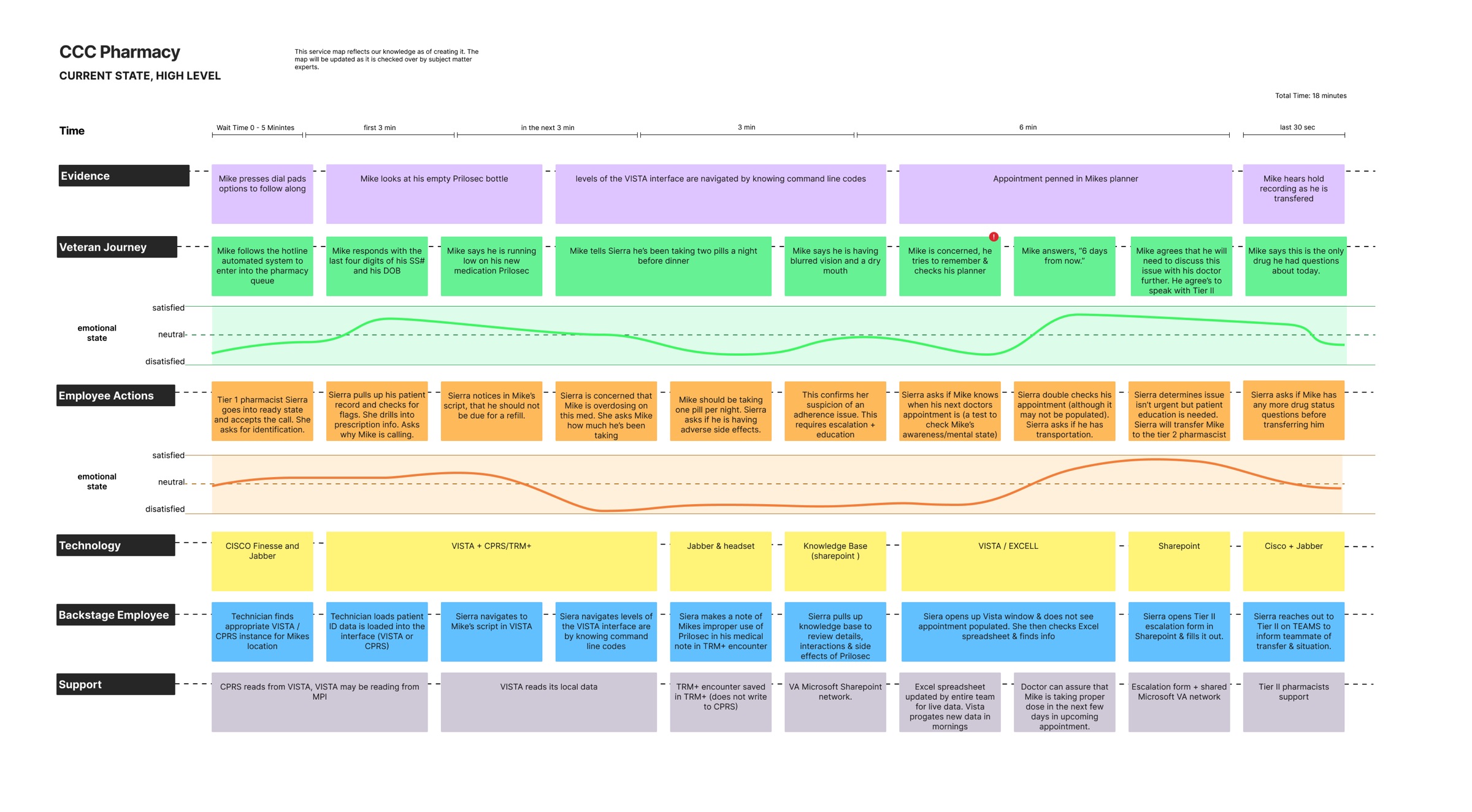
One pharmacy call, as it worked before. The veteran's steps and mood on top, the pharmacy tech's underneath, and the yellow lane showing which tool she's in at each moment. Click to open full size.
Service design
Eighteen minutes, eight programs
I mapped four kinds of call from the first ring to the hang-up: scheduling, nurse triage, pharmacy, and virtual clinic visits. Each map follows what the veteran and the employee do, how each of them feels, and which tool is on screen.
In the pharmacy map, a composite of what staff showed me, a veteran phones because he's running low on a heartburn medication. The tech pulls up his record in a system she gets around by typing command codes from memory, and works out that he's been taking double the dose. The records system only refreshes overnight, so she checks a spreadsheet her team keeps current by hand to find his next appointment. Then she fills out an escalation form in SharePoint, messages the pharmacist on Teams, and transfers the call.
That's eighteen minutes and eight programs. The veteran spends the last thirty seconds of it listening to a hold recording.
Research
Six people on one call
I turned the interviews into six archetypes: the veteran, a scheduler, a triage nurse, a Tier 1 pharmacy tech, a Tier 2 pharmacist, and a virtual-care physician. The team used them to make decisions.
The split between the two pharmacy tiers is a good example, because it decided who could see and do what in the system. About half of a Tier 1 tech's calls are renewals she can finish herself. The rest go up to a Tier 2 pharmacist, who needs everything the tech already learned so the veteran doesn't have to say it all again.
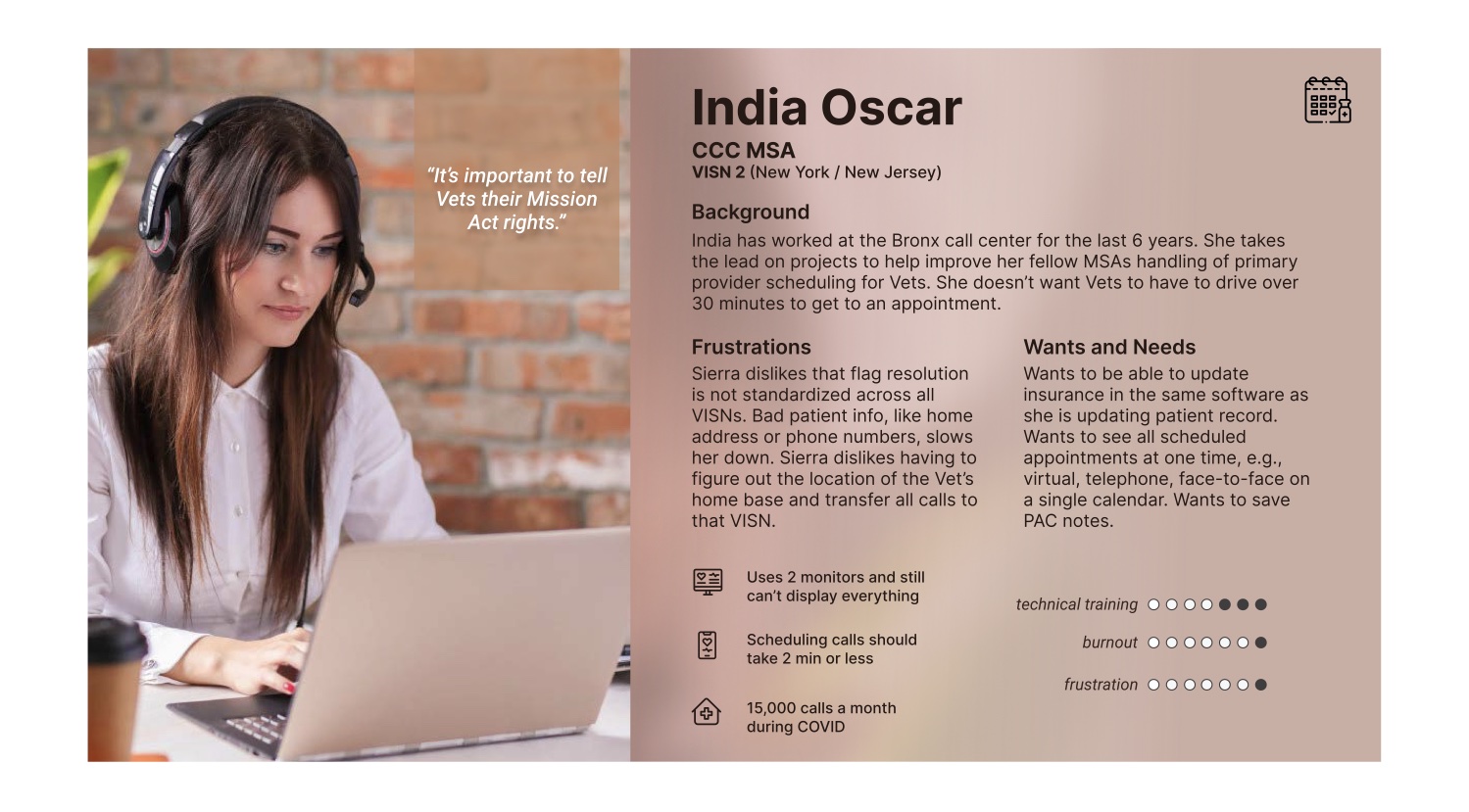
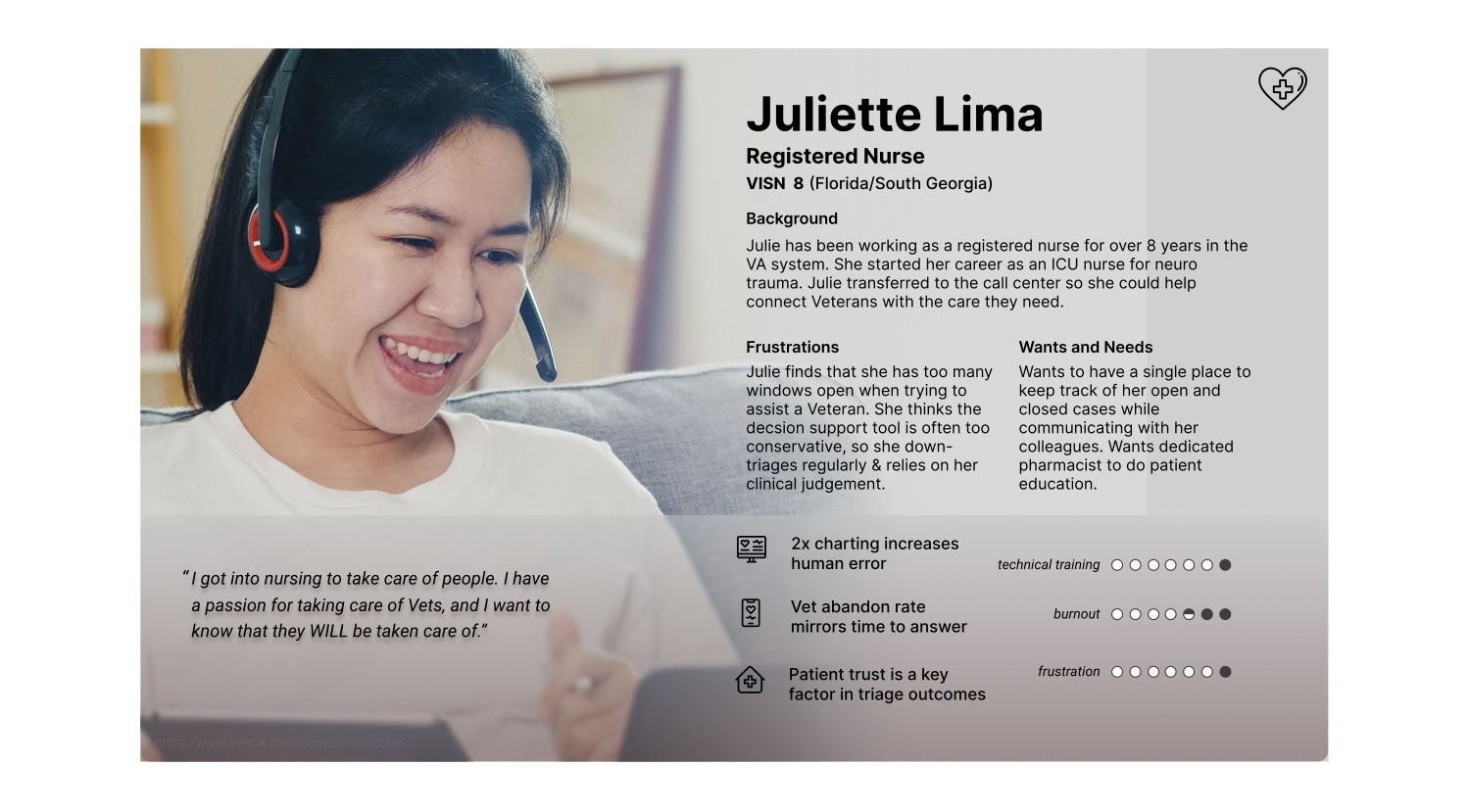
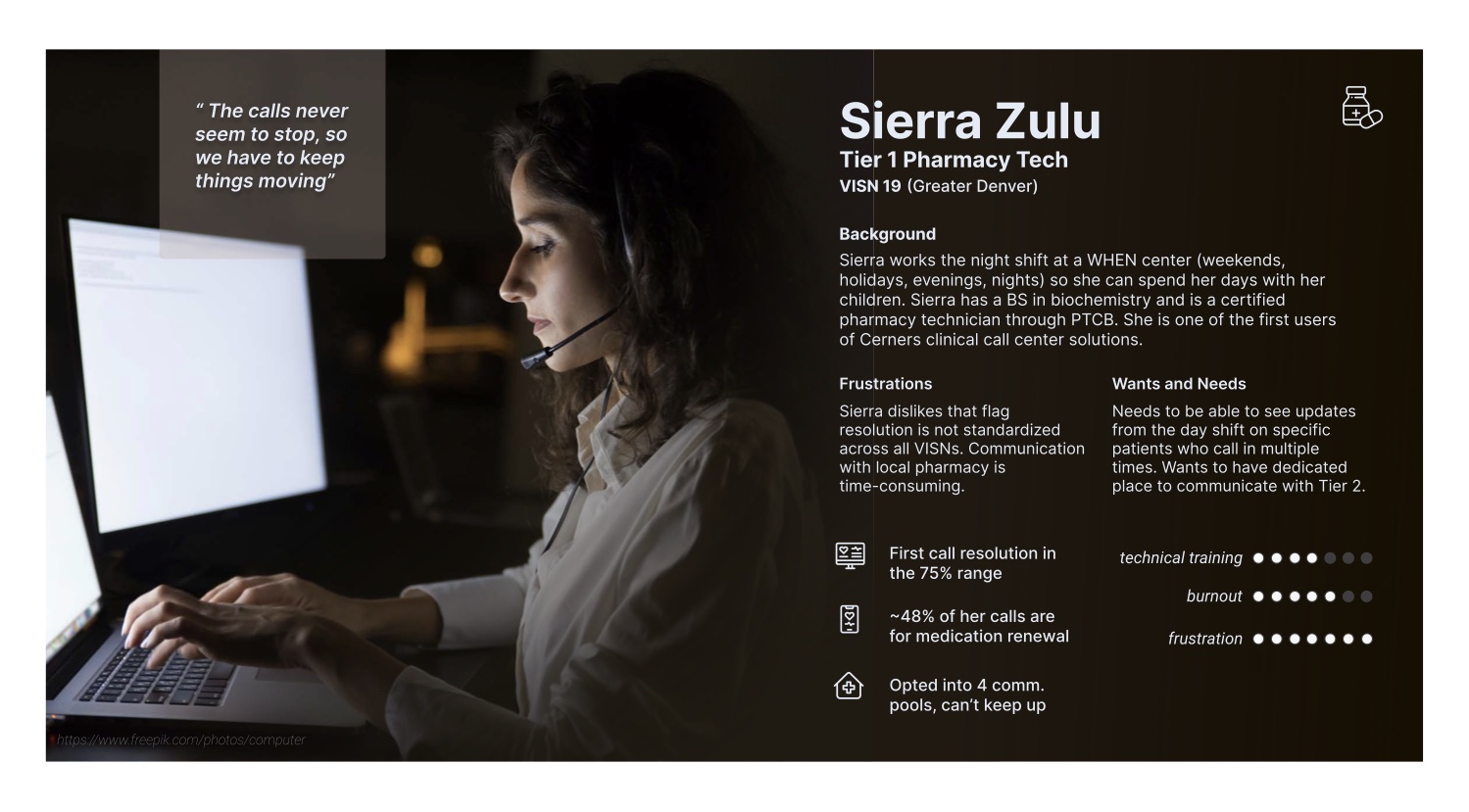
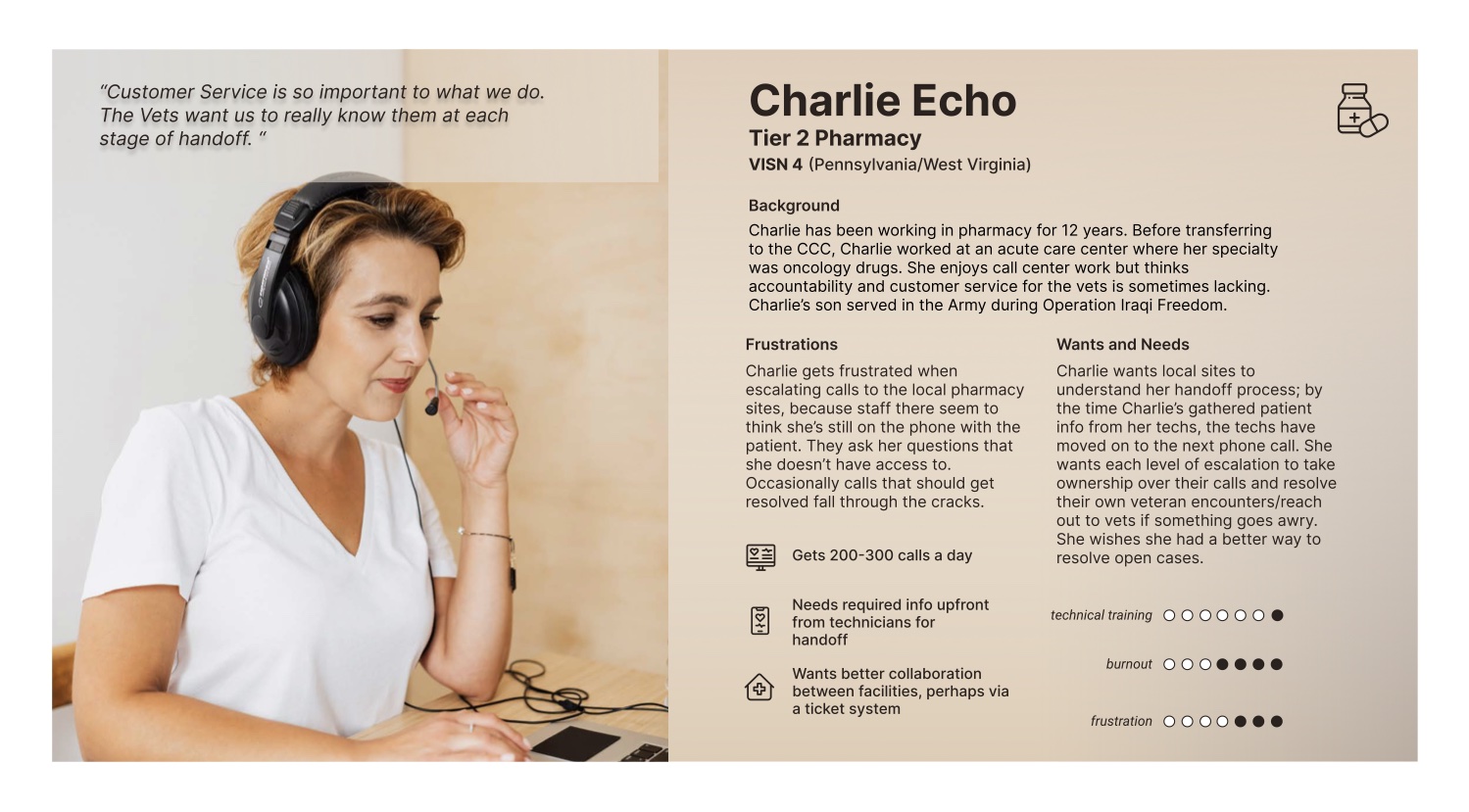
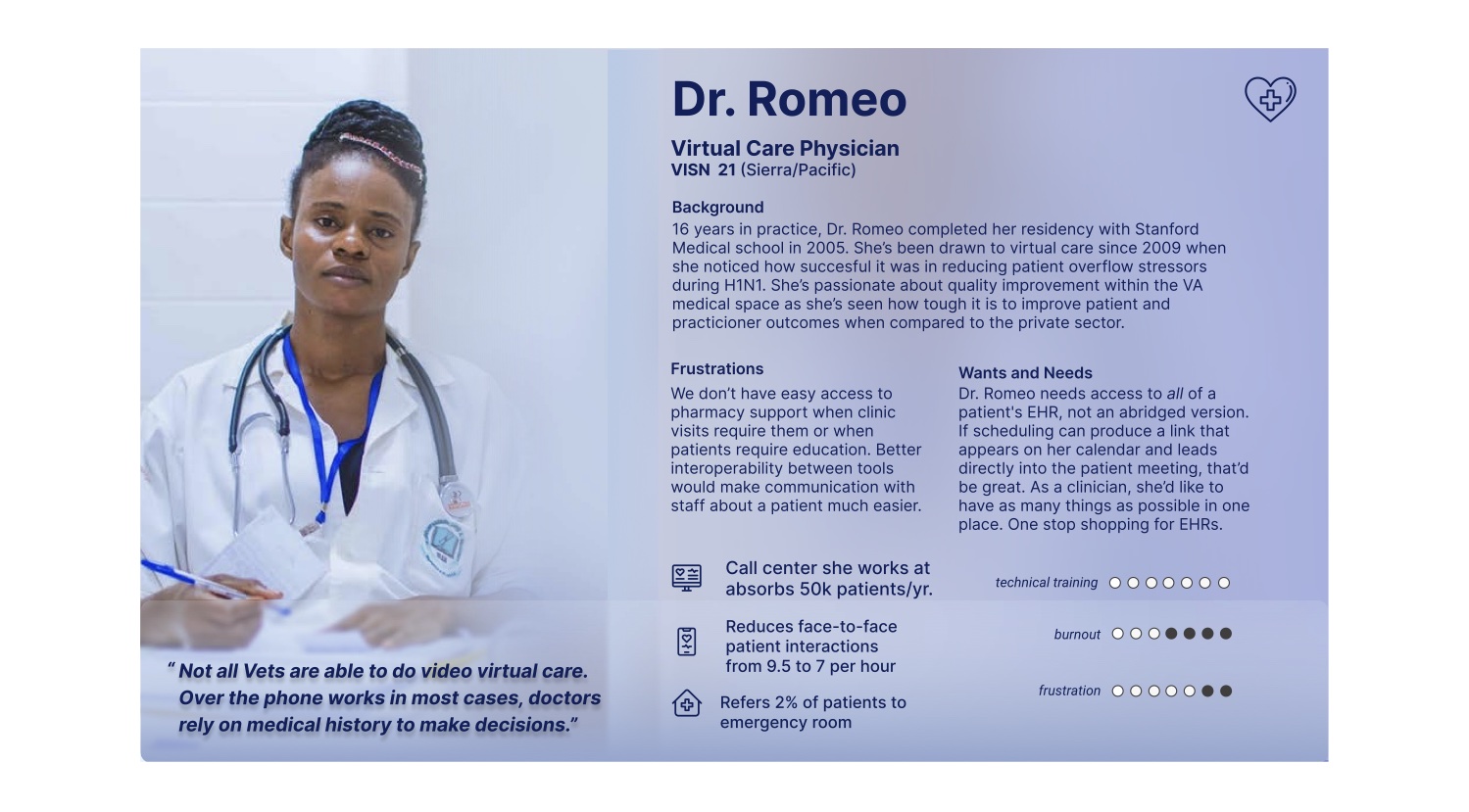
The five staff archetypes. Scroll sideways to see all five.
Design
Prescriptions tracked in a Teams chat
Pharmacy work runs across Tier 1 techs, Tier 2 pharmacists, and the physical pharmacies that fill the orders. When I started, they kept track of veterans' prescriptions in a Teams chat. Nothing logged who had or hadn't had a prescription filled, and nothing recorded its status. A veteran who spends winters in Florida could also have a separate health record there and another back home in Virginia.
So a veteran could be told a prescription was ready, drive a long way to the pharmacy, and find it wasn't. Or a mail-in never arrived. Gaps like that in care can be dangerous.
In the CRM, we turned all of it into structured data. The account is the veteran, not a health record or a VISN, the VA's regional network, so one person has one record. A Tier 1 tech can track a prescription's status and pass an action to Tier 2 in Salesforce, and Tier 2 sees every outstanding action on their dashboard, so nothing falls through the cracks. This shipped in the first release.
AI
An AI triage assistant inside the nurse's workflow
The CRM covered four workflows: scheduling, triage, pharmacy, and virtual clinic visits. For triage, we integrated a third-party AI triage assistant through an API, opening inside the nurse's workflow. While on the phone with a veteran, the nurse could use it for triage recommendations. Like USA Class, it supports a decision instead of making one.
A third-party support chatbot also lived in the CRM to help guide people around it.
Decision
Deciding what gets built first
The backlog had user stories from four workstreams running in parallel, and the deadline would fit only some of them. The MVP hadn't been defined yet, so I offered to run the prioritization: every story placed on a two-by-two of value to users against effort to build, one session per workstream, with the business analysts.
The stories in the high-value, low-effort corner went to the front of the sprint plan. We took everything else to the client as a conversation about trade-offs. We also found the same features written up by different workstreams, which we'd otherwise have built more than once.
I also worked with the business analysts to place each requirement in the larger map of workflows and information architecture, so we could see how the pieces connected.
Design
Designing inside Salesforce
Almost everything had to be built from Salesforce's own components, so the VA could maintain the product after our contract ended. I went custom only where the standard part made a clinical task harder.
Whenever the developers built a component the quickest way Salesforce allowed, I'd take a screenshot of the build, redraw it, and bring it back to them. The first eligibility panel squeezed a veteran's enrollment and benefits into four tight columns. I redrew it in three with room to read, and that version guided the builds that came after.
Leadership
From one designer to two
I began the project as its only designer and later hired a second. To bring them in I shared the research, the history behind decisions, the stakeholder map, and the small pieces of context that usually stay in one person's head. We worked side by side every day until they had enough context to own work on their own, without creating a new handoff problem inside the design team.
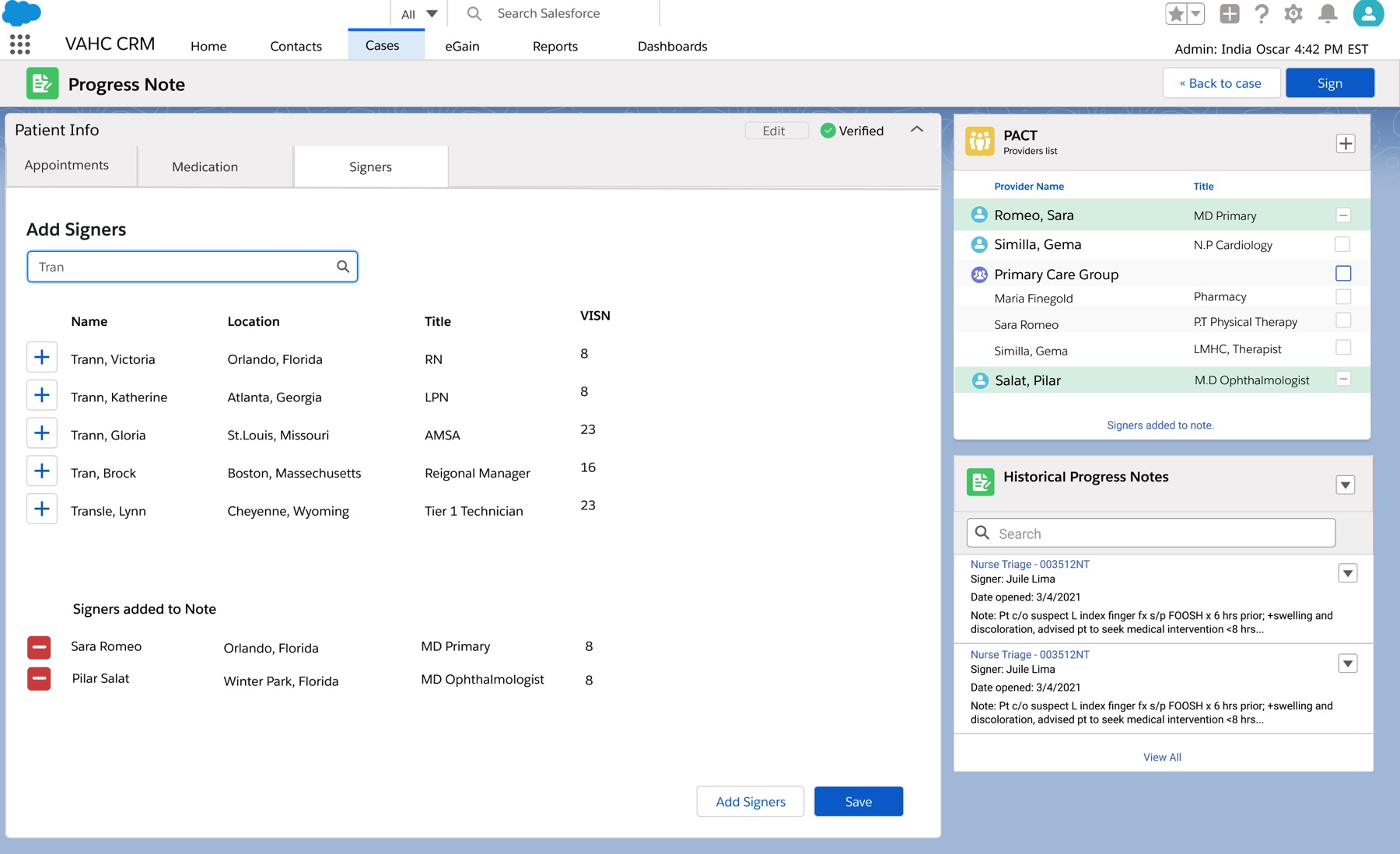
Adding co-signers to a progress note. The nurse can add doctors straight from the veteran's care team on the right, or search for anyone else. Names and patient data are fictional.
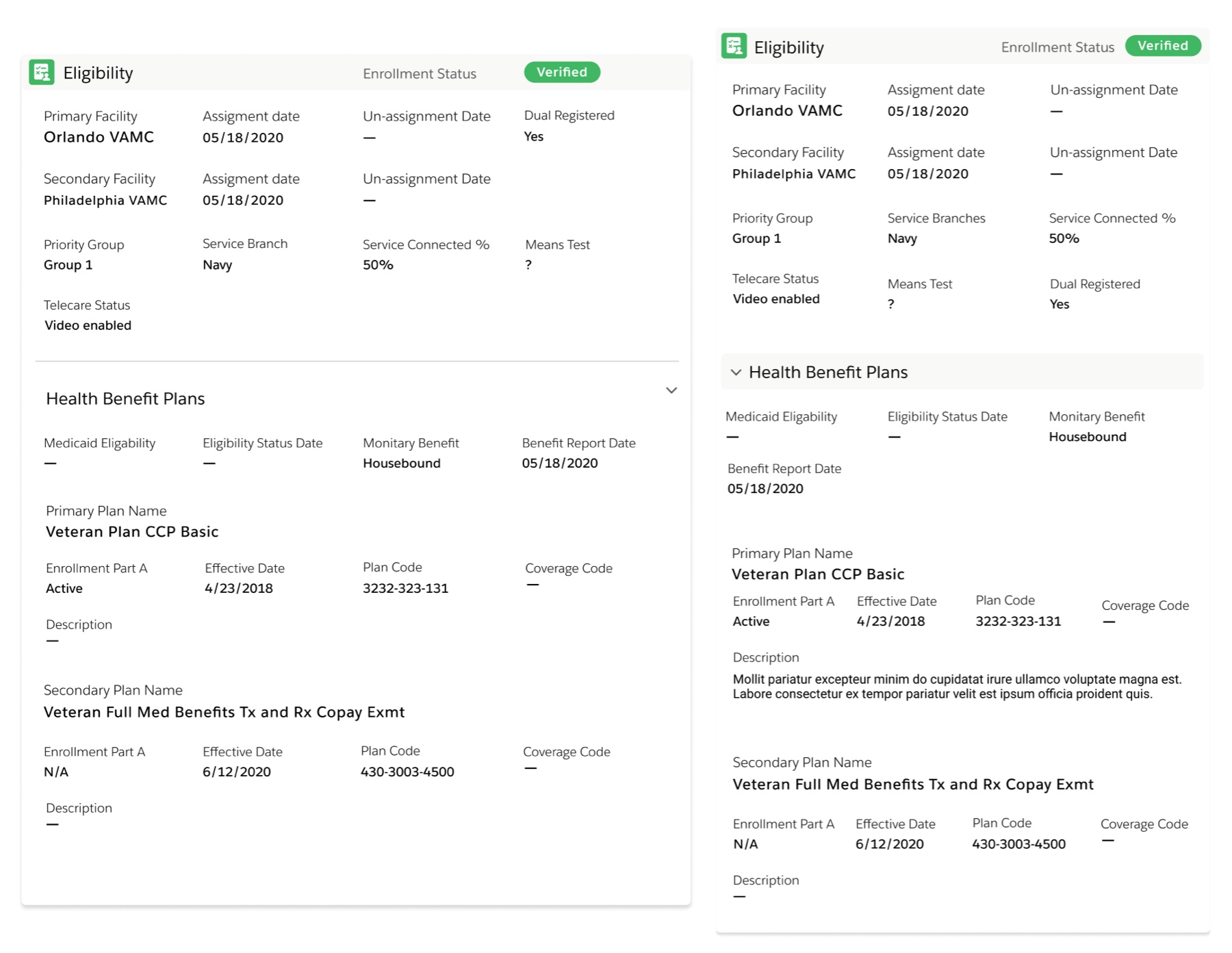
The eligibility panel, as first built (left) and as redrawn (right). The same information in three columns instead of four.
Outcome
What shipped, and what didn't
In August 2021 the first release went in front of super users from the first pilot network: a physician, pharmacy leads, triage nurses, and a scheduling lead, the people who would train everyone else.
Refills, progress notes, and co-signing now lived in the CRM. The scheduler with seven medical centers no longer needed seven copies of the triage tool or seven of the charting tool.
The pharmacy team was candid about the rest. Someone listed what they would still have open all day: the records system, the charting system, two phone tools, and Teams, with the CRM on top. My team had recommended holding parts of ordering and prescribing back until they were more refined. They shipped in release one, and they solved some real problems. The team logged every comment from that training as a training gap, a missing requirement, or a roadmap item, and assigned each one to a release.
I moved to another company before launch. The release went live after I left, and in 2022 the VA published a short video about the service, which it calls VA Health Connect.
VA Health Connect, from the VA's own YouTube channel, June 2022. It runs a minute and a half. Watch it on YouTube if the player doesn't load.
Reflection
Looking back
I'm proud of the scale of it. Two designers covered scheduling, triage, pharmacy, and virtual care for the whole VA, and we had to learn each workflow well enough to design for it, with limited access to users.
This is the project I'd most like to do again. With what I've learned since, I'd bring more structure to how design worked with the developers, especially on Salesforce's low-code and no-code builds.
The workflow brought call records, progress notes, co-signing, ordering, prescribing, statuses, and alerts into the CRM, giving staff a more consistent way to see what had happened and what still needed action.
I cannot give a defensible before-and-after number, because I never tied the design work to one. If I began again, I would choose that measure in the first week: how often does a veteran have to call back about the same problem? For the man who drives twenty minutes just to get a signal, that is the outcome that counts.