Case study · AI-first product · Compliance-heavy UX · U.S. Office of Personnel Management · 2026
An AI tool for the people who set federal pay grades
USA Class is OPM's AI tool for drafting position descriptions, the documents that help set a federal job's grade and pay. I was the only designer on its workflow for supervisors, which works differently from the one for individual contributors, and I designed it to keep every decision with the classifier.
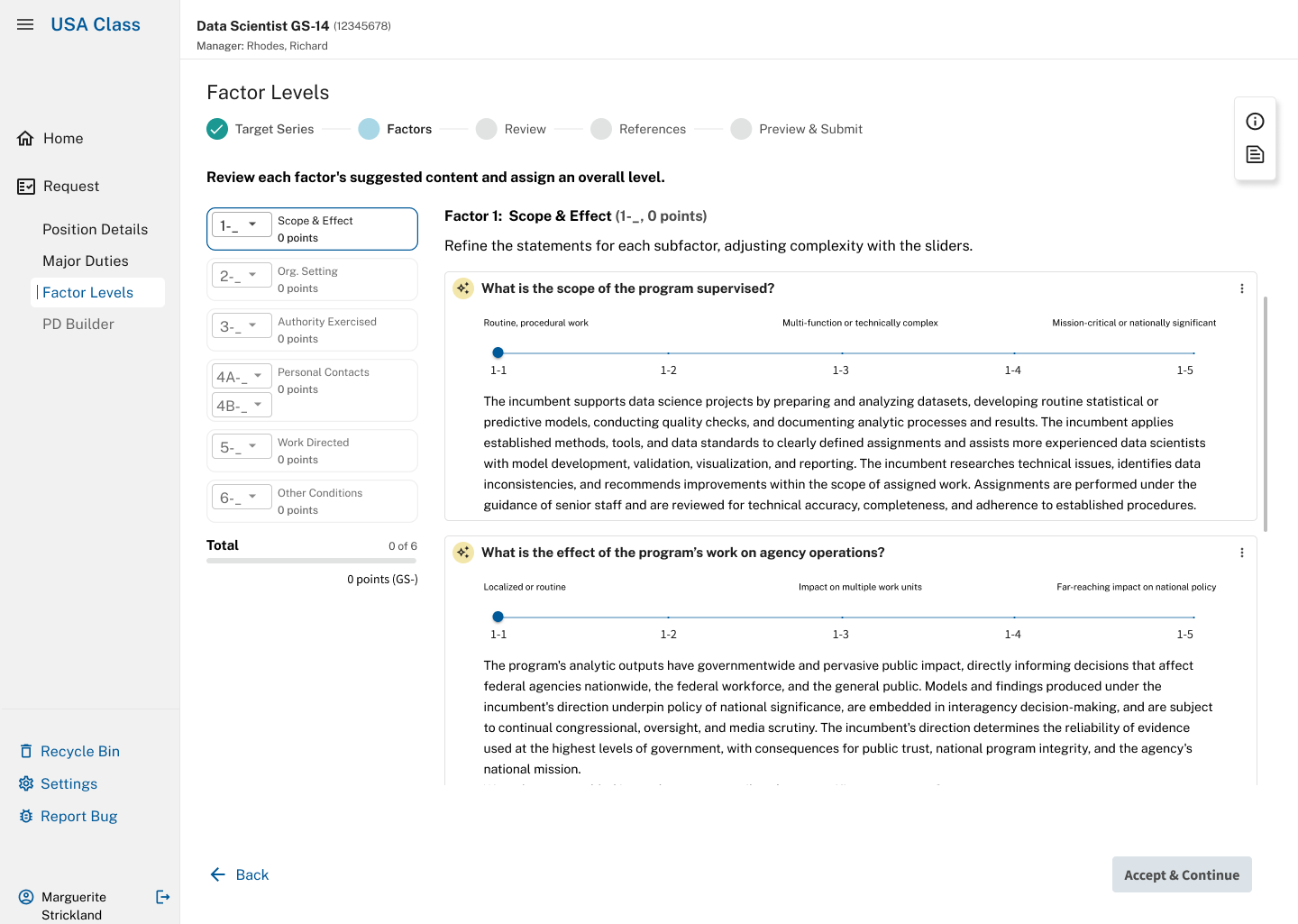
USA Class, Factor 1. The AI has drafted both statements, and the total on the left still reads 0 points. Nothing counts until the classifier assigns a level.
The problem
A position description sets a federal job's title and pay grade. USA Class uses AI to help specialists draft one. It handled individual contributors, but supervisory jobs are graded with a separate six-factor guide that had never been built into the product. The acceptance criteria were long and full of jargon.
My role
Lead UX designer, and the only designer on the supervisory workflow. I designed the entry screen, six factor screens, and references page, working closely with classification subject-matter experts (SMEs), a data analyst, and the product team.
What happened
USA Class is live. My supervisory workflow was in development or shipping when I rolled off the project, so I don't have usage results. Classification SMEs approved the direction through ongoing reviews, consultation, and level-setting.
TeamProduct manager, AI engineer, lead classification expert, data analyst, business analyst, QA, developers ToolsFigma, Figma Make, Claude, Claude Code, Copilot, Azure DevOps
Context
The product writes a document that helps determine someone's salary
A federal classifier works through six factors, choosing a level for each one. Those choices add up to a grade, and a single move on one control can be worth 325 points. If a level is wrong, the pay is wrong, and the agency can end up with a grievance or an audit finding.
Other designers had built the MVP for individual contributors. Supervisors and managers are graded under a separate guide, the General Schedule Supervisory Guide (GSSG), and their workflow works differently. I was the only designer on that path, and my job was to design it and help the team get it built.
I had no background in federal classification, and I said so. That gap became a useful discipline: for every instruction, label, and generated statement, I asked whether it came from the official guide, a written requirement, a specialist's ruling, or somebody's guess.
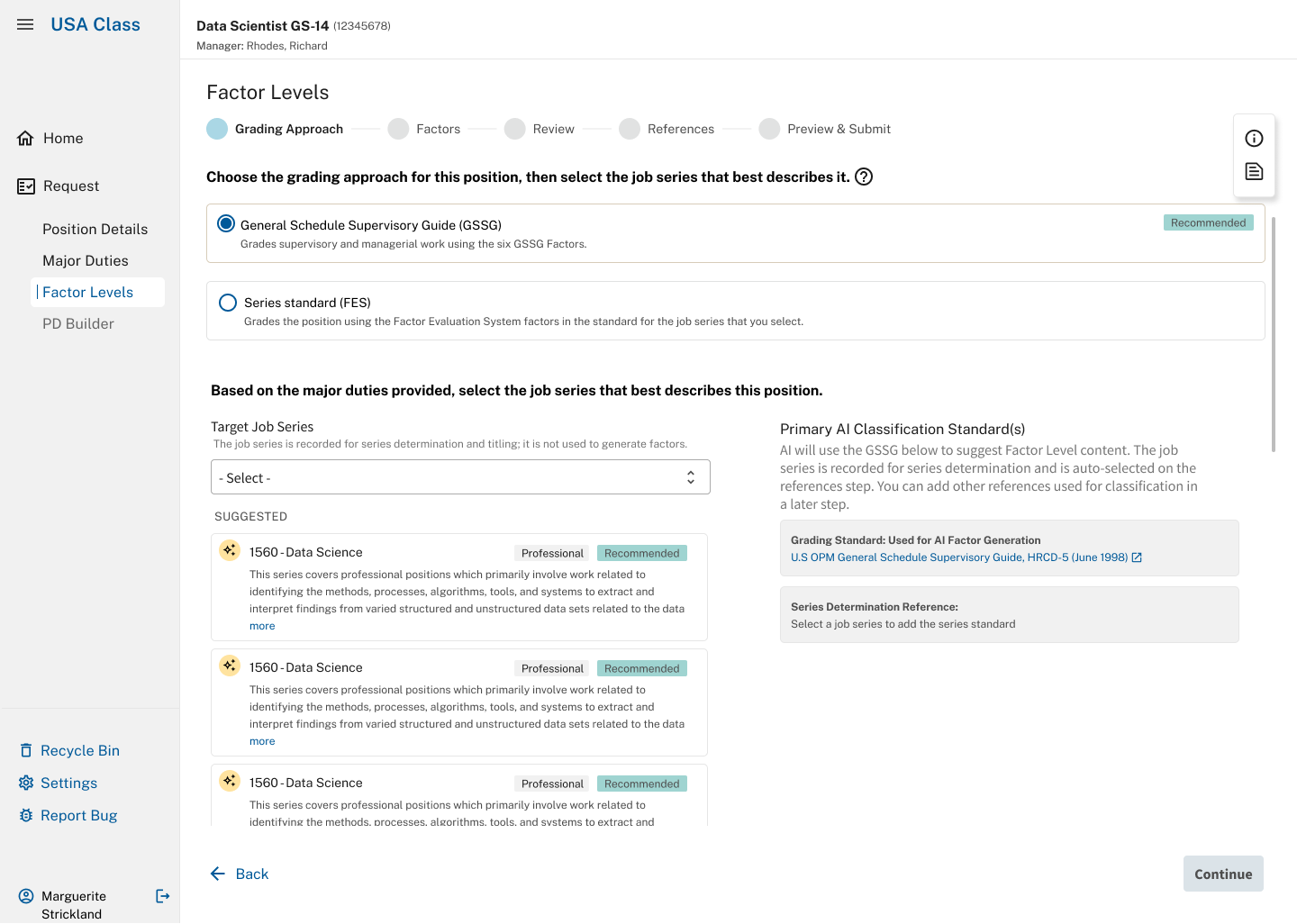
The entry screen. The classifier picks which guide applies. Every screen after this one depends on that choice.
Working through the criteria
Where did this sentence come from?
The acceptance criteria were long, dense, and full of jargon, with very little guidance on what anything meant. I used Copilot to dig through documentation across the organization for definitions, and for decisions already made on open questions in the user stories. AI also helped me read the compliance language more than one way before I designed against it. That let me make design decisions with little oversight and still meet strict criteria.
Asking where each sentence came from caught things. The instruction on Factor 2 asked classifiers to judge "complexity" and "required knowledge and skills," words carried over from the other grading system. Factor 2 only asks where the job sits in the reporting chain, which is a fact. The screen was asking experts for a judgment the guide never asks of them.
It caught me too. On Factor 6, I had shortened six level definitions so they would fit side by side, believing the requirements called for it. They didn't. In a product where the exact wording matters, I flagged it for the expert to approve or reject.
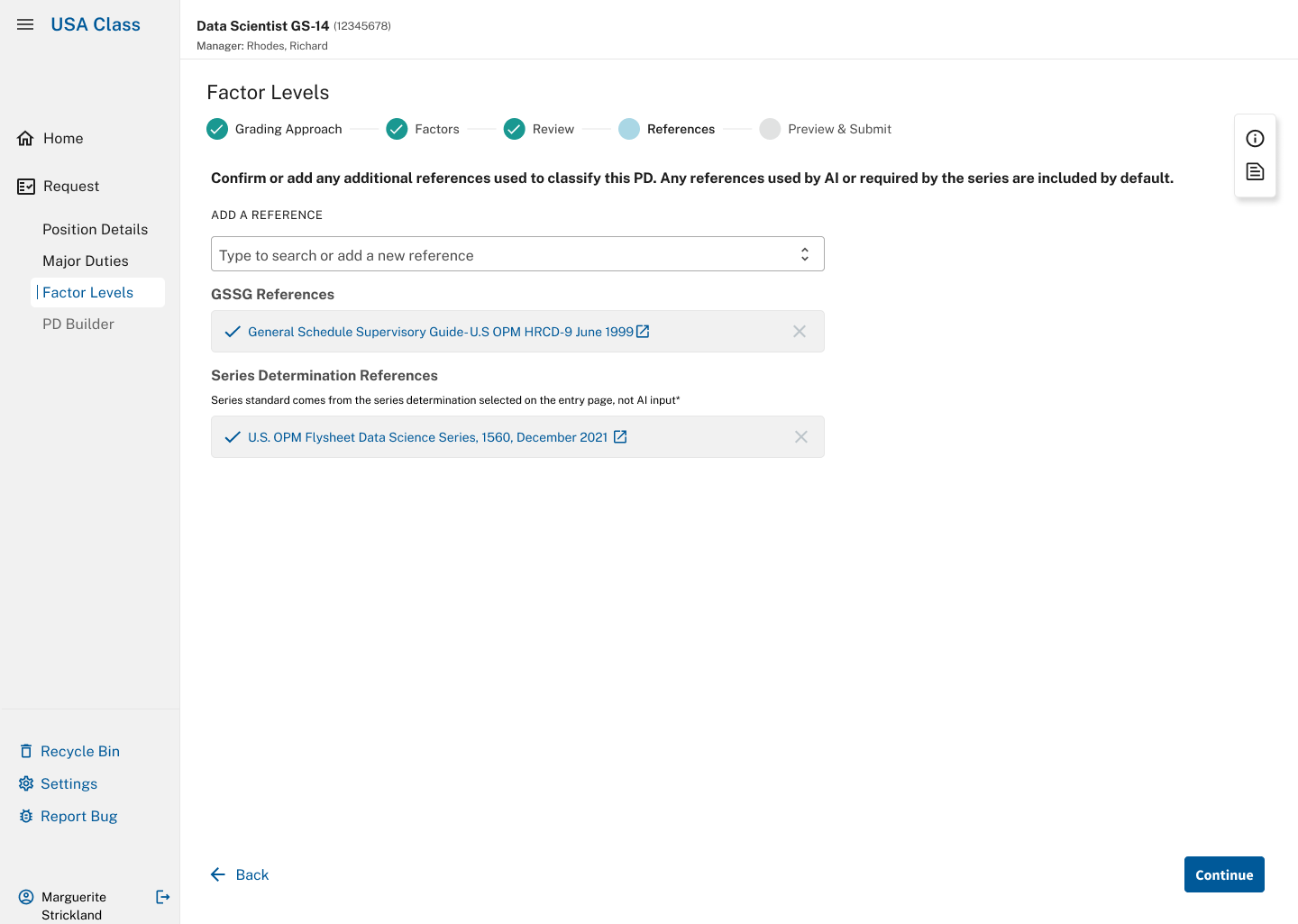
The References step. Before submitting, the classifier confirms which official guides the document rests on. The series standard is labeled as coming from their own choice on the entry screen, not from the AI.
Decision
We agreed on the boundary together
Early on, the team argued about how much the AI should carry. Our AI engineer made the case that a model choosing pre-written statements from a list "is really more of a prediction model than it is what generative AI is really built for." So the model writes, taking the position's duties and the guide's definitions as its material.
Our product manager, AI engineer, classification specialists, and I worked the rule out together: the model writes only after the classifier has chosen a level, and it writes to that choice. We also worked with our data analyst and a classification expert on the instructions and guardrails behind the model's suggestions. My responsibility was to make the boundary visible in the interaction and keep it from eroding during development.
The level control is the most prominent thing on each page. Changing it regenerates the draft, and nothing the model writes can move it. No points count until a person has set a level, even where the system could make a decent guess. A number that's already filled in looks like something the classifier agreed to, and it's much easier to miss than a clumsy sentence.
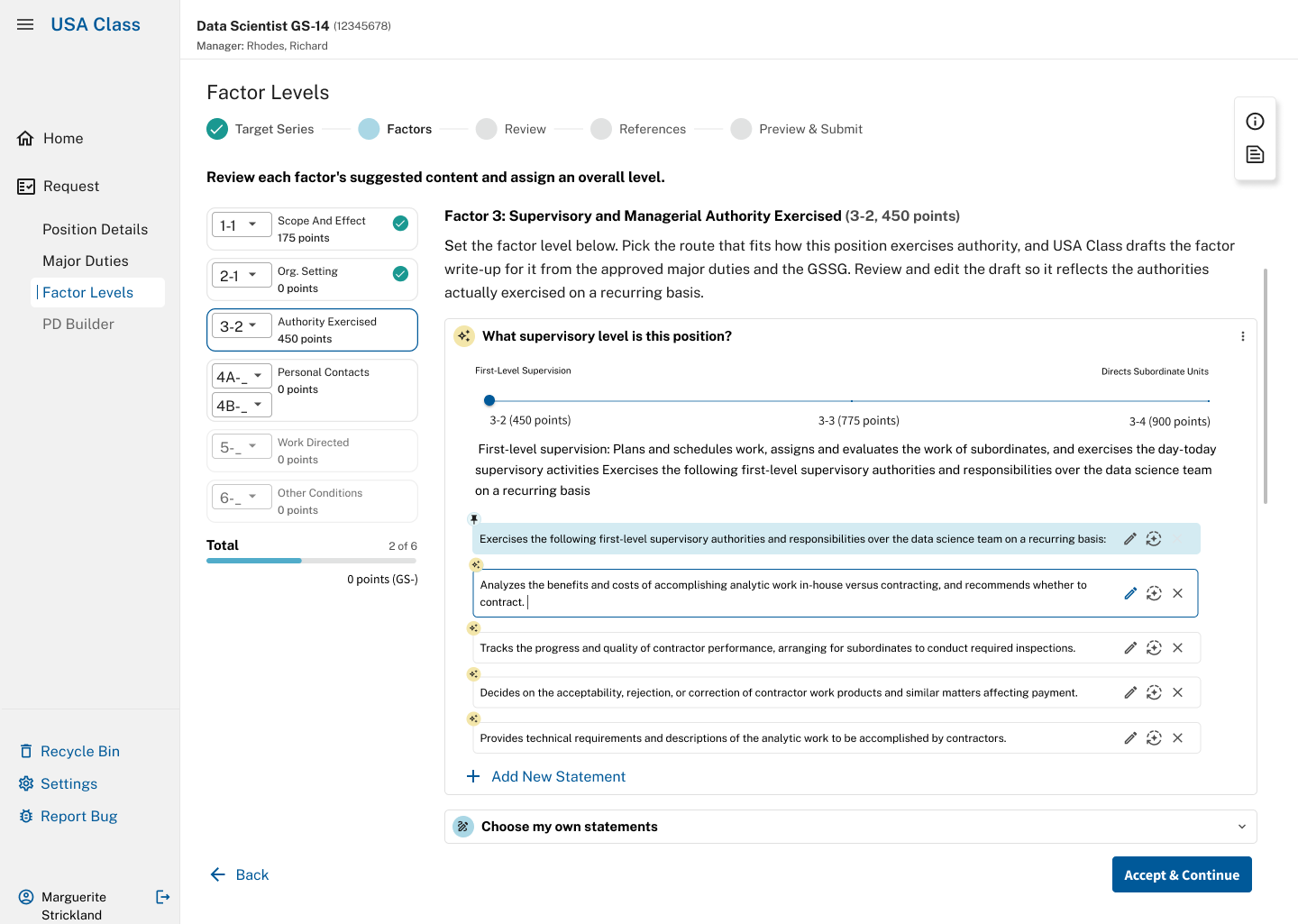
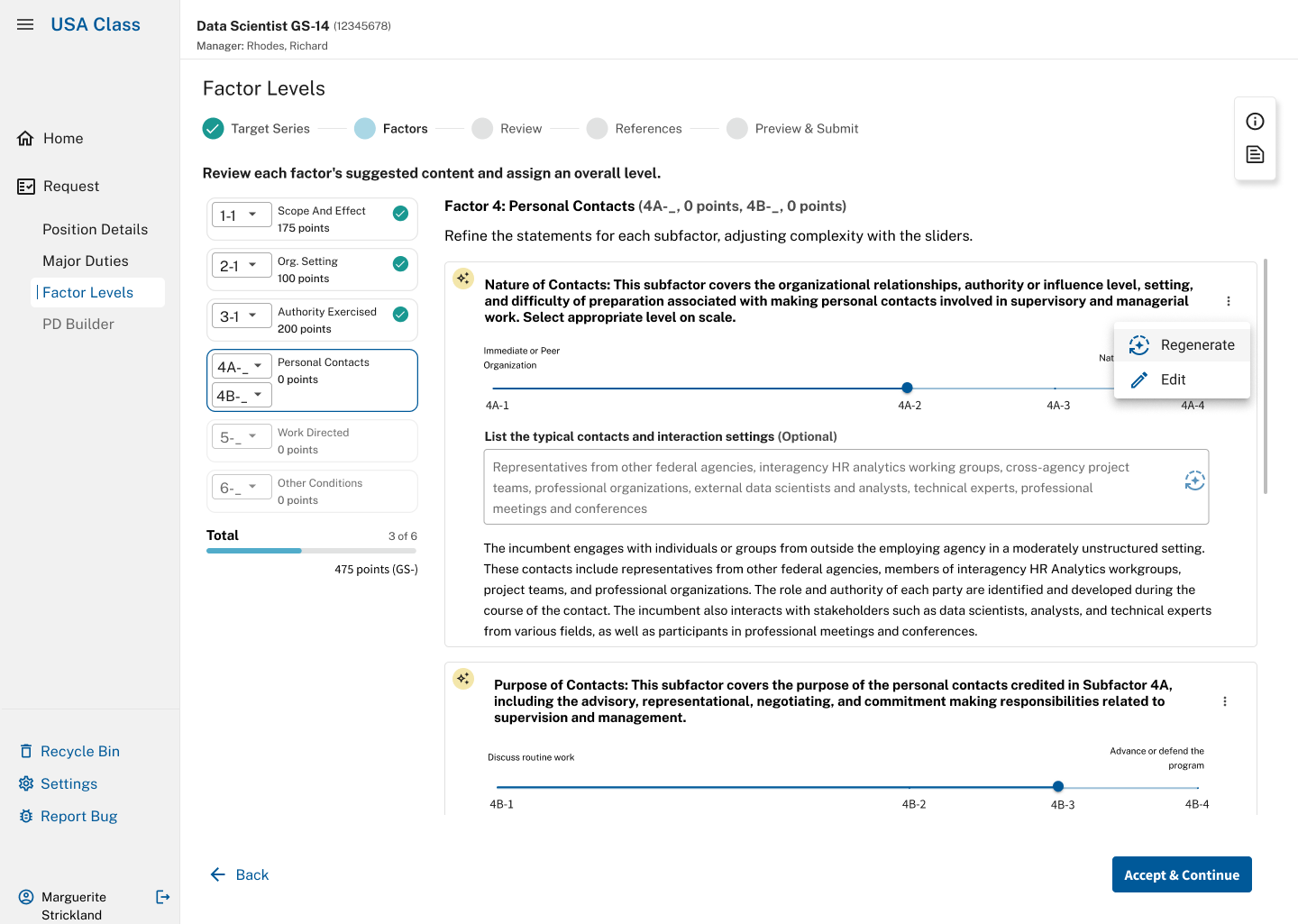
The classifier steers the draft. Left, on Factor 3 each drafted statement can be edited, regenerated, or removed, and they can add their own. Right, on Factor 4 they can list typical contacts to guide the draft, then regenerate or edit it.
Design
Three standards, all visible
On Factor 3, the product's habit was to show only the description for wherever the slider sat. But this slider is a choice between three written standards, and people need to read them against each other, so all three stay visible.
I also kept the descriptions out of hover tooltips. Someone using a keyboard or a screen reader can't get to a tooltip, and these are the words the decision rests on.
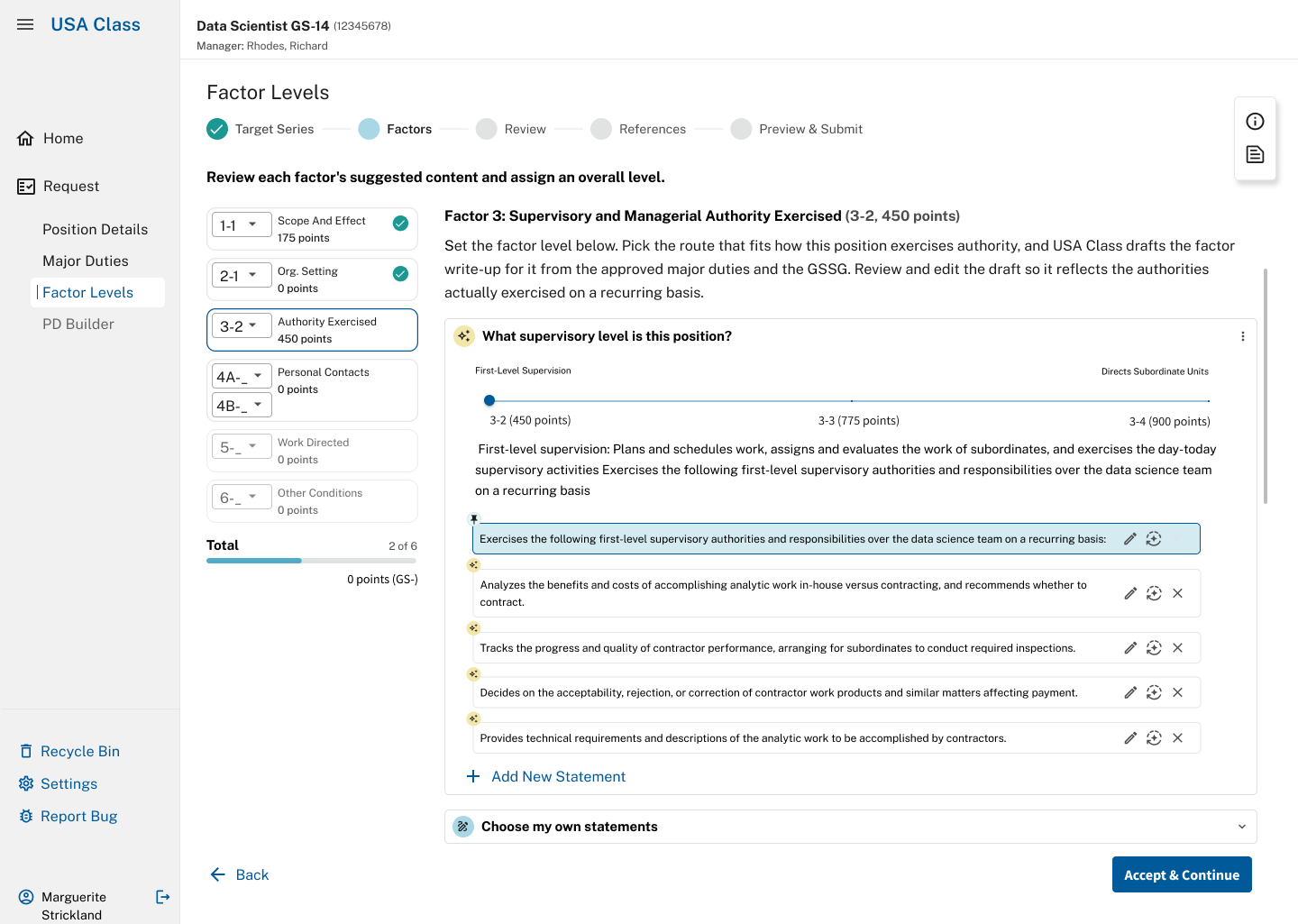
Factor 3. All three level descriptions stay on screen together, with the chosen one emphasized.
Design
A bonus level with nothing to attach to
Factor 6 has a rule. If a job meets three or more of eight "special situations," it earns one extra level. While working through the prototype, I noticed you could tick three boxes before setting any level at all. The interface had no answer for what the extra level was being added to.
Borrowing a starting level from another control would have had the software choosing the level, which is the one thing it isn't supposed to do. So I designed three states. Before a level is set, a grey "+1 pending" marker appears and the point total doesn't move. Once the classifier sets a level, the credit appears beside their choice, marked as the system's addition. If the level is already too high for the rule to apply, the page says why.
I built a small prototype with a button for each state, so the expert and the developers could click through the logic for themselves.
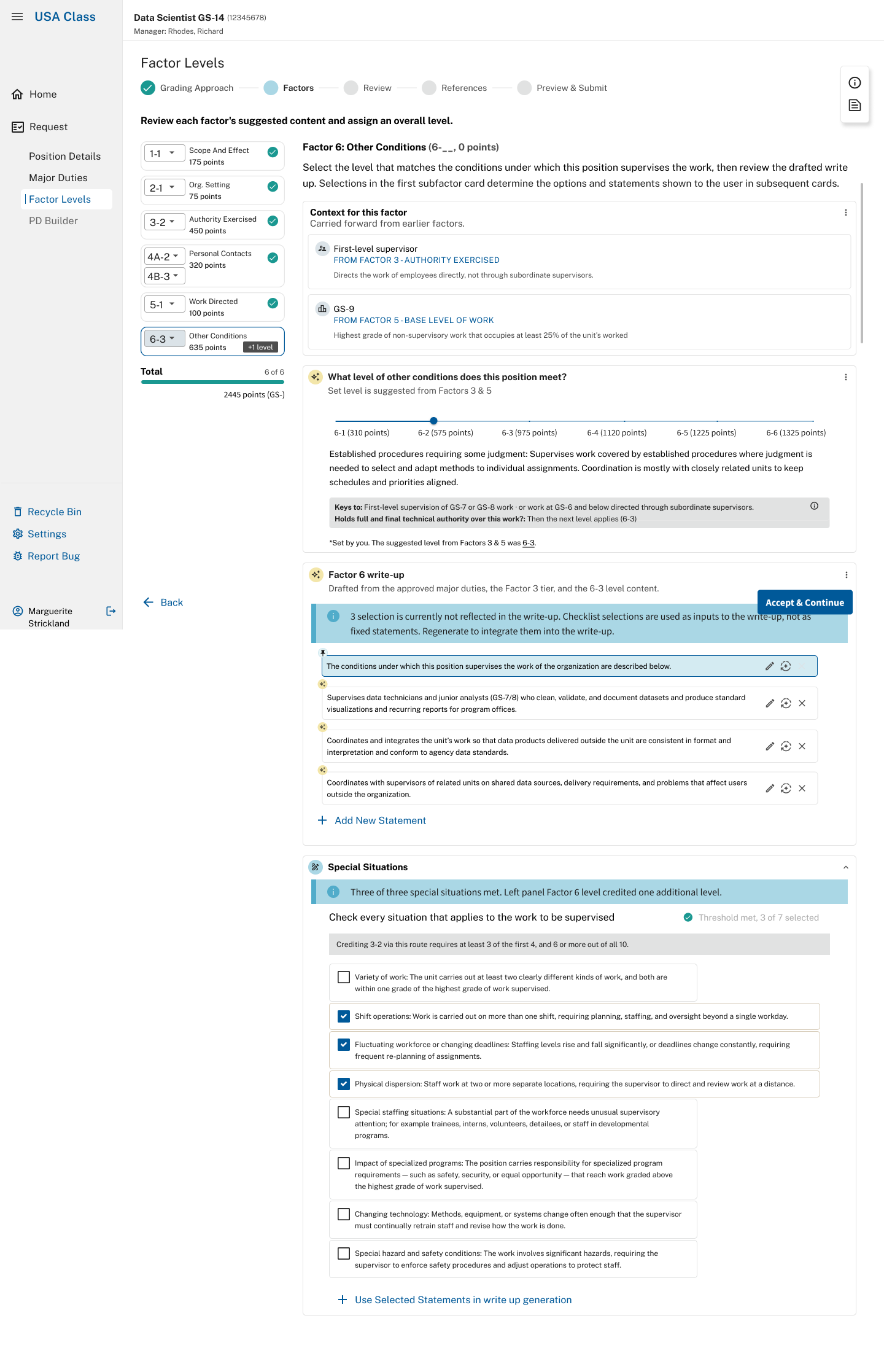
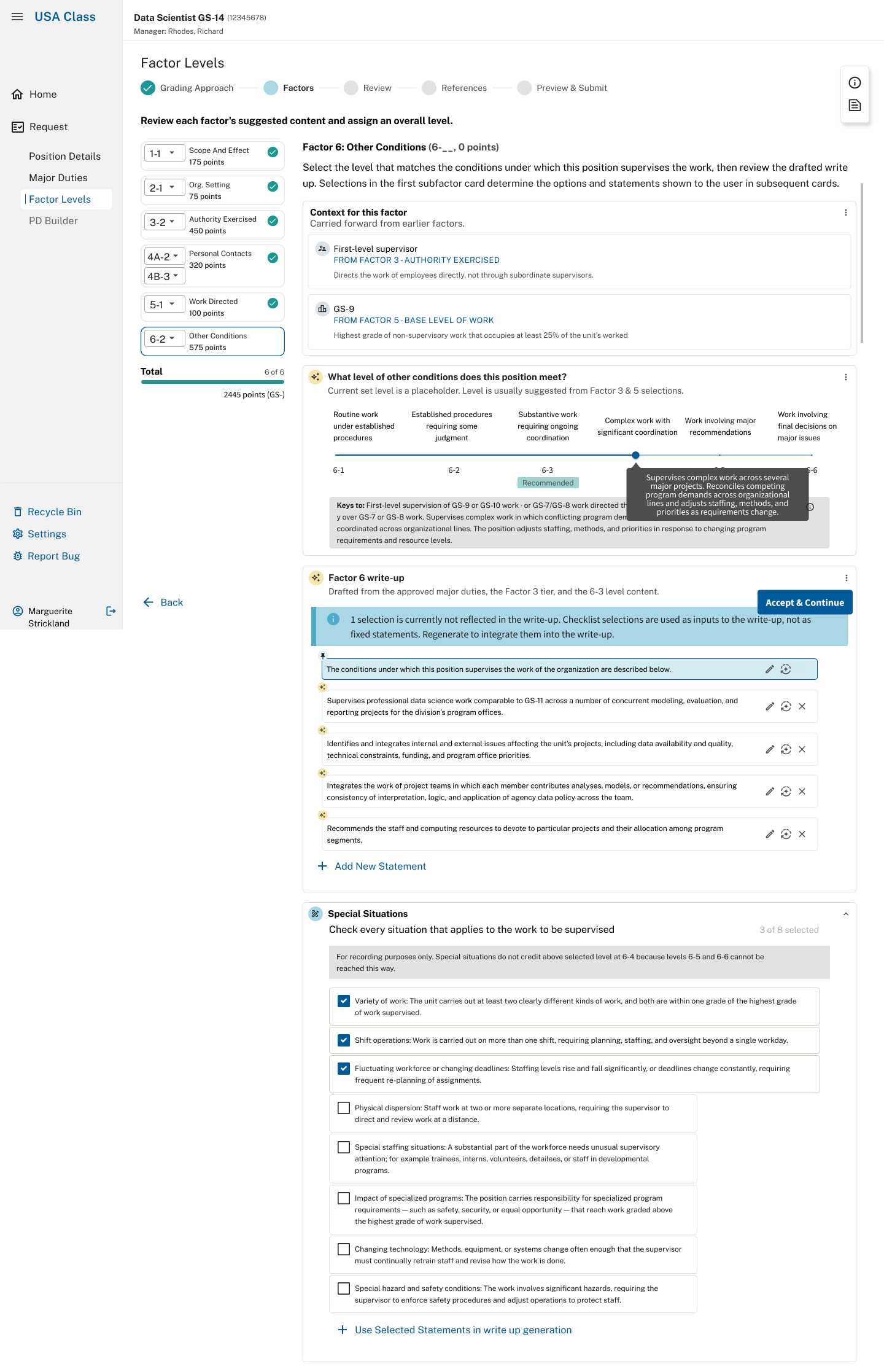
Factor 6, before and after the classifier sets a level. Left, three situations are checked and the credit waits. Right, the credit is applied and flagged, next to the classifier's own choice.
Design
A known gap in one suggestion
Factor 6 also suggests a level, calculated from two inputs. The guide has a third condition that raises the answer by one, and the control that used to ask about it had been removed. So for a whole category of jobs the suggestion comes out one level low, and we knew it.
I rewrote the note beside the slider so it asks the question directly and admits the gap:
Holds full and final technical authority over higher-graded work? Then the next level applies. The suggestion does not account for this; move the slider if it applies.
It only appears on the two levels where it can change the outcome. I also told the product owner in writing that the note doesn't close the gap, and asked whether we should bring the question back.
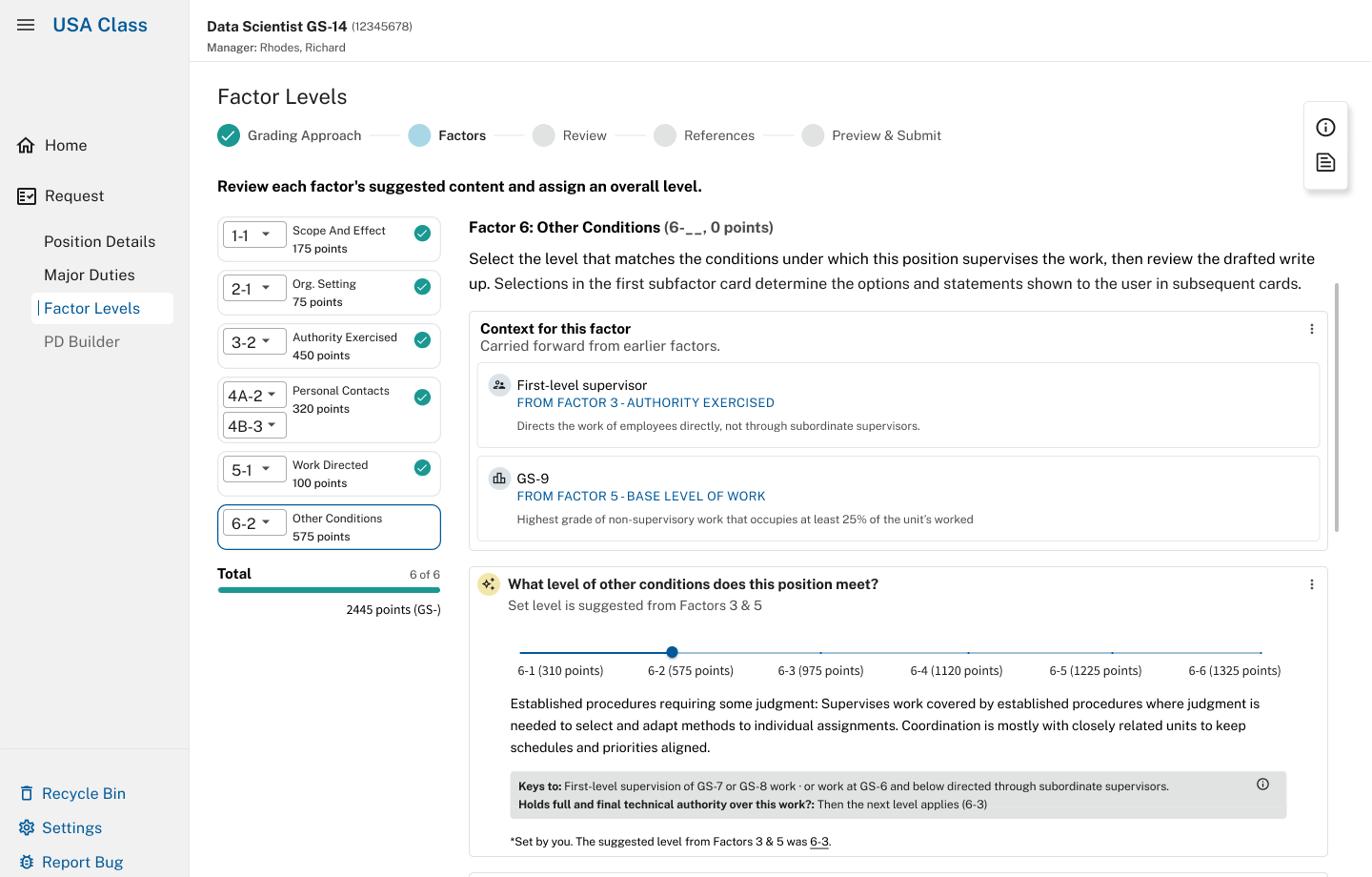
The note beside the Factor 6 slider. It asks the missing question directly. Underneath, the page shows the level the classifier set next to the one the system suggested.
Collaboration
Overruled
We proposed hiding the supervisory path whenever a position didn't meet the criteria for it. Our lead classification expert reversed that in the meeting.
"I'd rather provide flexibility than guardrails and disappoint. It is a PD draft and not a classified PD in the end. The classifiers know what they're doing, trust them as competent professionals."Lead classification expert
He was right. I'd been designing guardrails for a beginner, when the people who use this know the guide better than the tool does. Both paths now stay visible. When the facts on file don't match the choice, the system says what it sees and asks whether to continue.
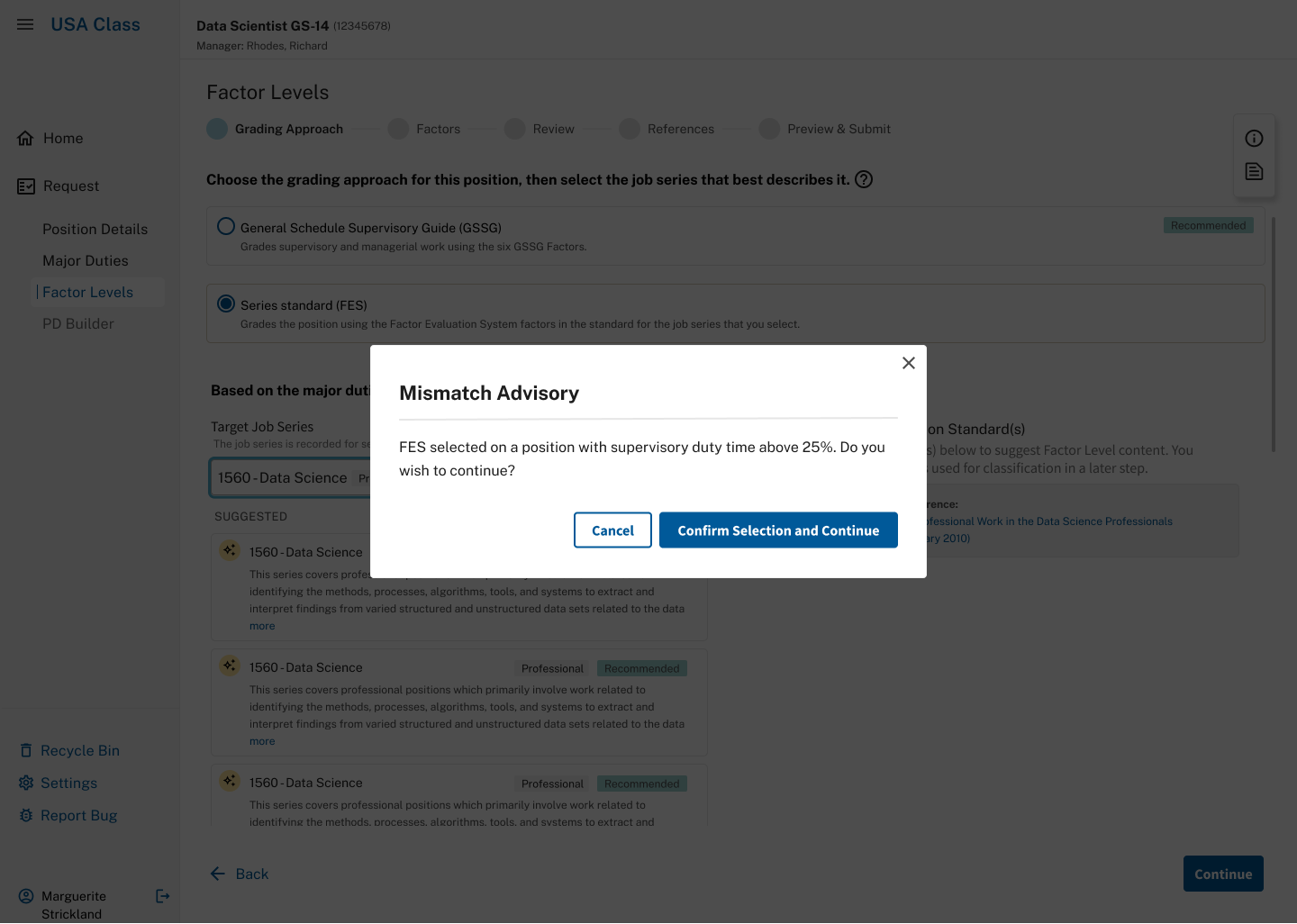
What replaced the guardrail. The system says what it noticed and leaves the decision with the classifier.
AI in my workflow
How I used AI on my own work
AI was part of nearly every step of my process. The judgment calls stayed mine.
- Copilot, to search the organization's documentation for jargon I didn't know and for decisions already made on open questions.
- Claude Code, to spin up prototype ideas and to try different readings of compliance language and interface copy.
- Deliberately rough AI mockups in review meetings, so the conversation stayed on features.
- A decision log drafted from meeting transcripts and corrected by hand. When a question came back three sprints later, there was an answer and a name next to it.
- A QA pass where AI compared every screen against the earlier designs and flagged components, copy, or interactions that didn't match. A script also checked 154 strings of interface copy against the prototype.
Collaboration
Working with little oversight
When my product manager was short on time, I recorded one- to two-minute design review videos she could watch and comment on in Teams on her own time. It was a powerful way to work asynchronously.
The team now has an explicit boundary to protect as the screens are built. The model may draft language, surface a pattern, and explain a rule, but it should not turn a suggestion into a decision while nobody is looking.
Reflection
What I'd do differently
Some components from earlier designs would have made this workflow smoother, and I wanted to bring them in. The production timeline didn't allow it, so I was asked to hold off and used patterns I wouldn't have chosen.
If I could keep going, I'd advocate for those updates next, along with direct testing of the full supervisory workflow with classifiers.