Case study · Platform design · Information architecture · Department of Homeland Security · 2024–2025
Modernizing Homeland Security's network for intelligence sharing and emergency response
HSIN is the Department of Homeland Security's official system for sharing sensitive information with federal, state, and local partners. More than 55,000 people use it to share intelligence and coordinate during emergencies, and it was running on an old SharePoint build. I led the research and design for its move to a new platform, including document management and custom lists each of its 1,500 communities can shape to its own work.
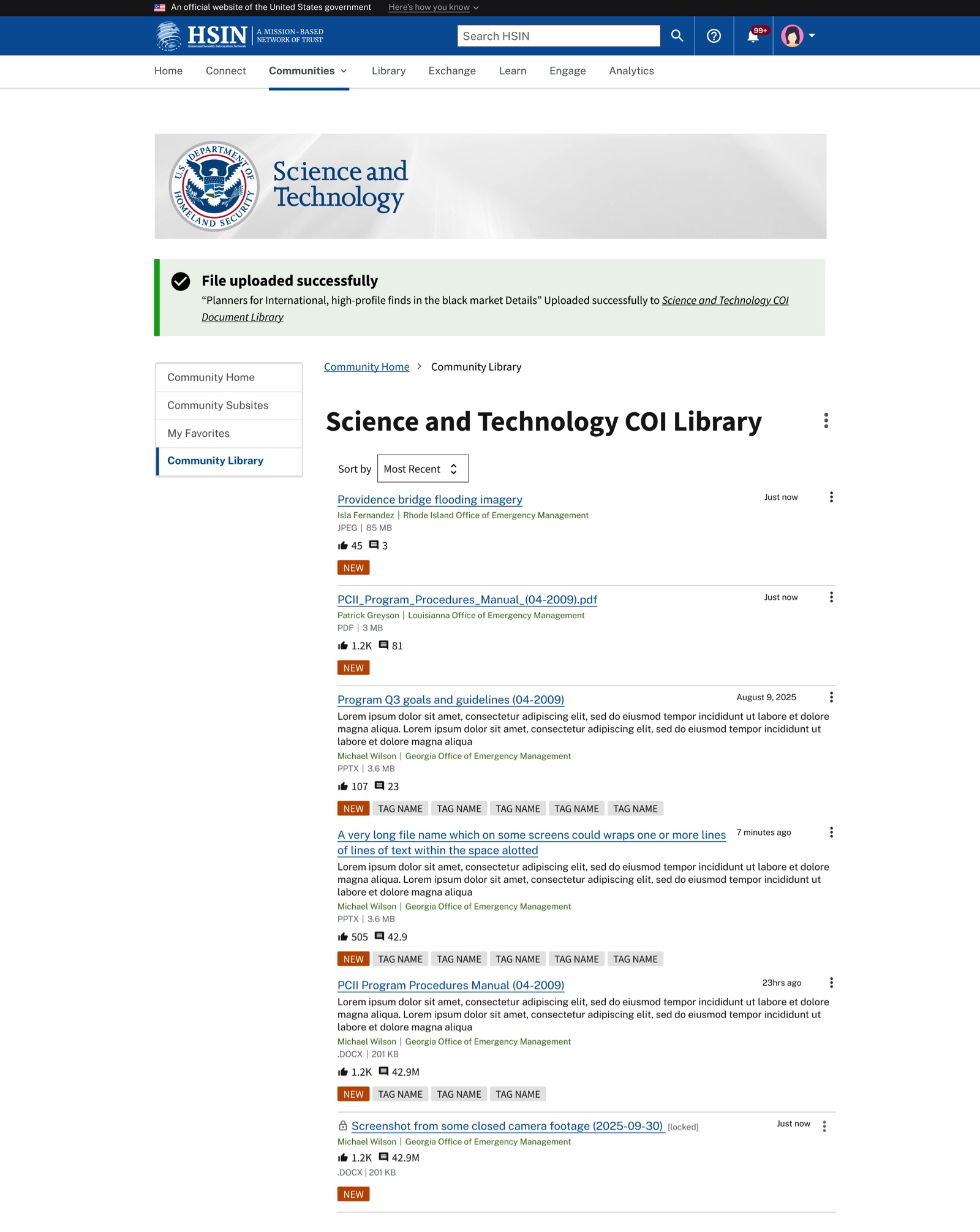
A community's document library in the new design. Newest first, with tags, the poster's name and agency, and a lock on any file someone is editing. Sample content.
The problem
HSIN ran on an old SharePoint build. People struggled to find things, and running a community meant repeating the same manual steps over and over. DHS decided to rebuild it on a new platform.
My role
Lead UX designer at Excella, on a design team of three with a design lead and a UI designer. I ran the research and strategy, designed document management and custom lists, and split the UI design. I stayed through development and accessibility review.
What happened
The research showed which jobs people's work depended on, with search and uploading at the top. I designed the first migration wave around those findings and stayed with the work through development and accessibility review. That wave launched in early summer 2026 with at least ten test communities.
TeamDesign lead, UI designer, product, and engineering, with DHS program staff observing the research MigrationSharePoint to Drupal MethodsTask-value ratings, moderated platform walkthroughs, design QA
Research
Fifty out of ten
He builds incident action plans for the Coast Guard, the documents a response team works from during an emergency. On HSIN, changing one meant downloading it, editing it, and uploading it again. So when I asked him to rate "edit a document online" from one to ten, he said fifty. After that, a "fifty" was our team's word for something that could not be cut.
I asked for those ratings at the start of every session, before anyone saw a screen. I'd read out eleven ordinary jobs, like searching for a document, uploading one, tagging it, or getting notified when it changes. For each I asked how important it was and how often they did it.
We were comparing three platforms using bare demo installs, and a demo with a nicer menu can win people over for the wrong reason. Knowing first what someone's work depended on let me weigh their reaction against it.
Research
What the sessions turned up
I ran more than a dozen sessions with intelligence analysts at state fusion centers, Coast Guard staff, a Customs and Border Protection team, DHS's science and technology office, and the managers of HSIN's intelligence library. What they valued most about HSIN was trust, and any new version had to keep it.
Searching for a document came out as the most important task, at 9.1 out of 10, and uploading as the one people did most often. People described where each one got stuck:
- Search only looked at document titles, so a phrase remembered from inside a report couldn't find the report.
- A manager who ran more than twenty communities had to set up alerts in each one by hand.
- New members were added to eight communities one at a time, and one document couldn't be posted to many communities at once.
"You shouldn't have to be an IT person or have a degree in library sciences to search and discover the content."A DHS administrator, in a research session
To keep one of those jobs in view, we sketched a day for a made-up repository manager we called Alexis. At seven she's sorting overnight reports. At eight she's labeling and versioning them. By three she's on email with another community, sorting out a mismatch between their copies outside HSIN.
The places people disagreed taught me more than the places they agreed:
- Downloading was rated a ten. Another group had been trying to switch it off entirely, so copies wouldn't leave the system.
- I got one request to add AI to search and one to keep it out. The second came from an analyst who said people in law enforcement wouldn't put sensitive material near it.
- Nearly everyone wanted to be told when a document changed, and the same people warned me about alert fatigue.
With more than 1,500 communities, any single default was going to be wrong for somebody.
We started out using AI to sort the qualitative and quantitative data from these sessions. At the time, the rules for generative AI at DHS were unclear, even for anonymized, non-sensitive data, so we stopped and did the synthesis without it.
Evaluation
Scoring the three platforms
At the end of each session I asked for a score out of ten for each platform. Averaged across everyone, Drupal came in at 4.3 and the other two at 7.0 and 6.4. In the demo, Drupal couldn't tag a document, had no notifications, and made you upload a file twice to share it with a second community.
These were bare demo installs and some sessions ran short, so I wouldn't lean on the decimals. Opinions also split by role, and one analyst liked Drupal best. We took the results and our recommendation to the federal stakeholders. DHS selected Drupal, and I used what people had shown us to design the experience they would still need on it.
Design
Designing for the gaps
Tagging came first, because the Drupal demo had none. Every document carries its tags, the name and agency of whoever posted it, and a marker when it's new. Tags get added while uploading, to one file or a whole batch. One daily user had told me what they wanted most was a list of what's new, newest first, so that's how a library opens.
- Communities got more than one library each, which changed the structure partway through the build.
- Coast Guard teams upload from boats and aircraft, so I designed phone layouts alongside the desktop ones.
- Search got two scopes, the whole network or only your community, because people told me those are different questions.
- Comments went in under each document. The people who publish intelligence reports had told me they hear nothing back unless they send out a survey.
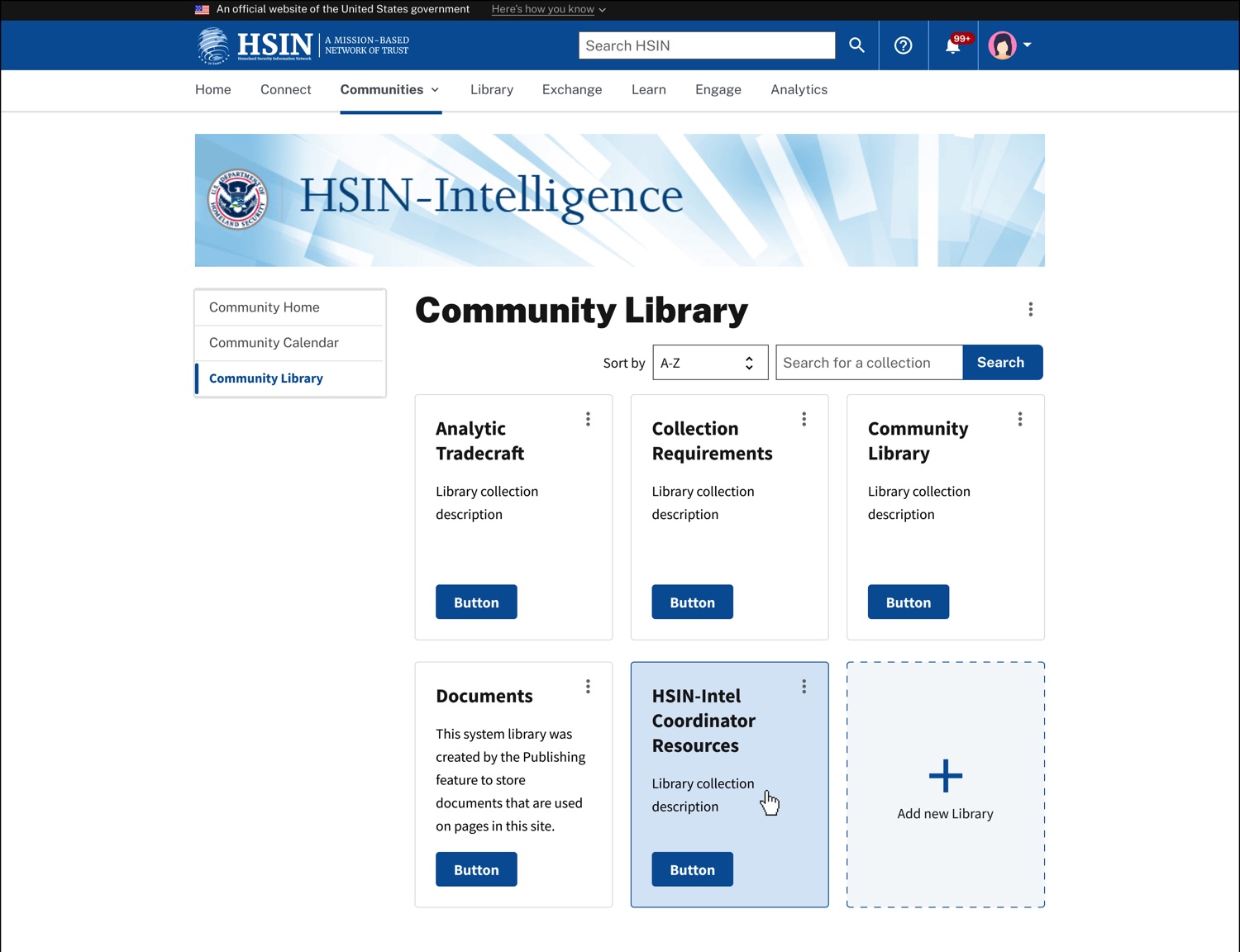
One community, several libraries. Each library holds its own documents, and a community can add another when it needs one.

Uploading, start to finish. Six screens, from an empty library to a confirmed upload, including what the page says when files fail to upload. Click to open full size.
Design
A list builder for 1,500 different communities
One long-time member told me a platform without lists should be ruled out on that alone. Every community tracks different things, so I designed custom lists. Any community can set up its own columns and build structured lists that show information its own way, much like a database in Notion.
Columns can hold text, dates, numbers, prices, checkboxes, dropdowns, lookups, people, links, and calculated values, and every column can be sorted.
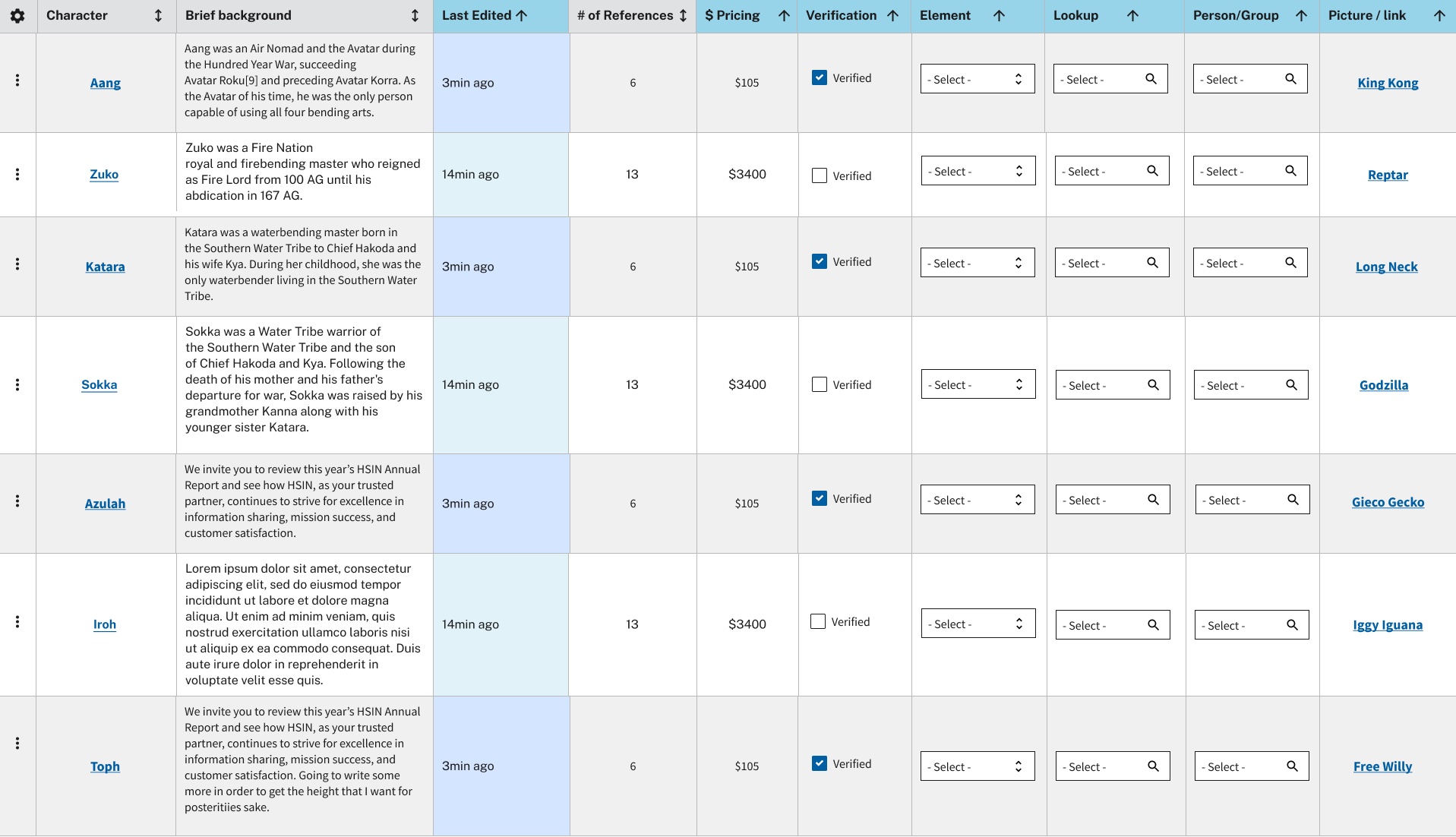
A custom list with a column of each type. This is early test content from our sandbox, so the rows are placeholders.
Design
Live editing is still open
Live editing was the fifty, and Drupal does not provide it out of the box. The current design uses file locking. Whoever is editing checks the document out, everyone else can see that it's locked, and a new version gets checked back in when the work is done. It prevents silent overwrites, but it is not the collaboration the Coast Guard planner asked for.
That gap remains open. The team will need to custom-build an answer, connect another tool, or accept a workflow users have said is not enough. Until then, the interface should be honest about the limitation.
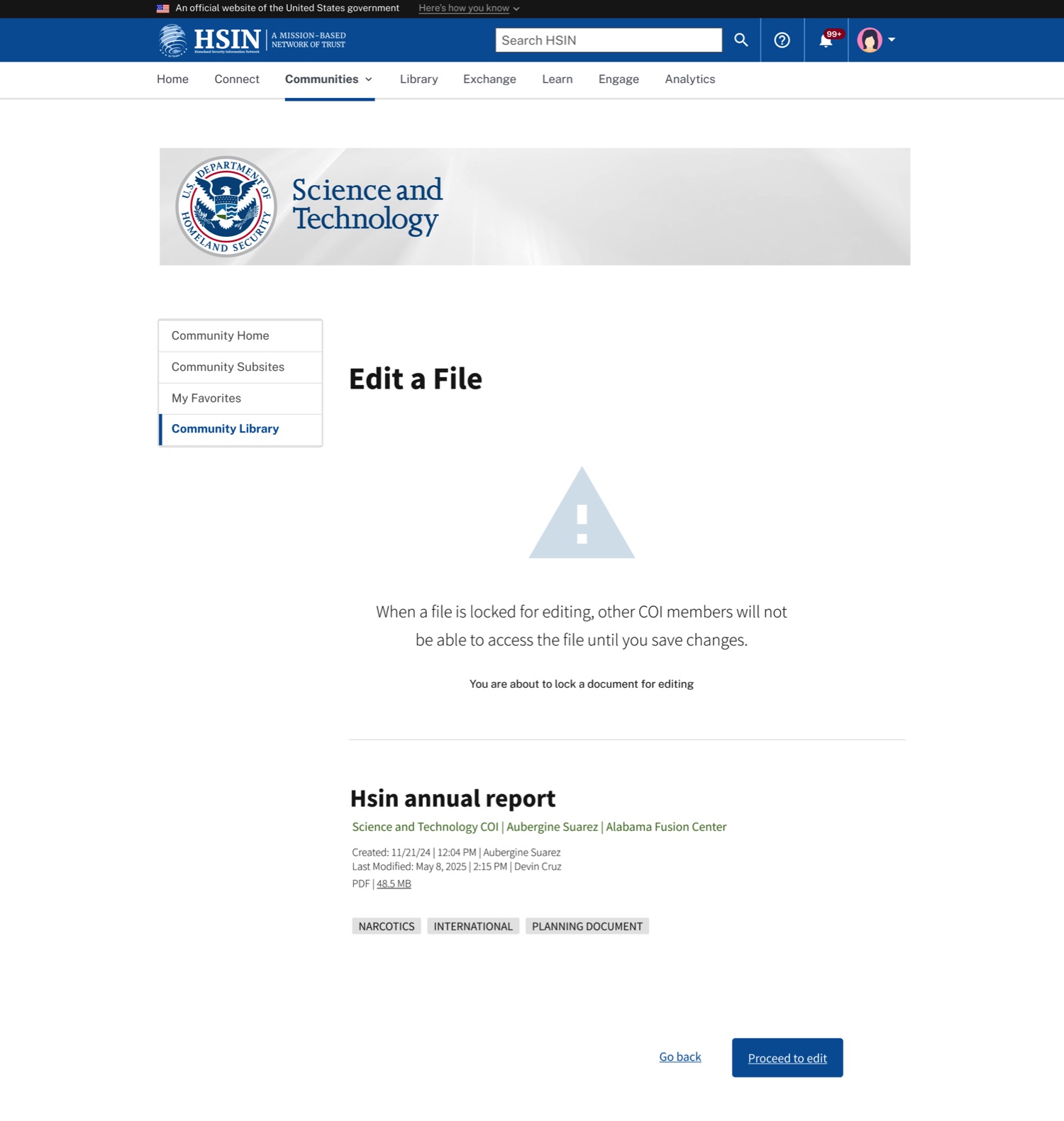
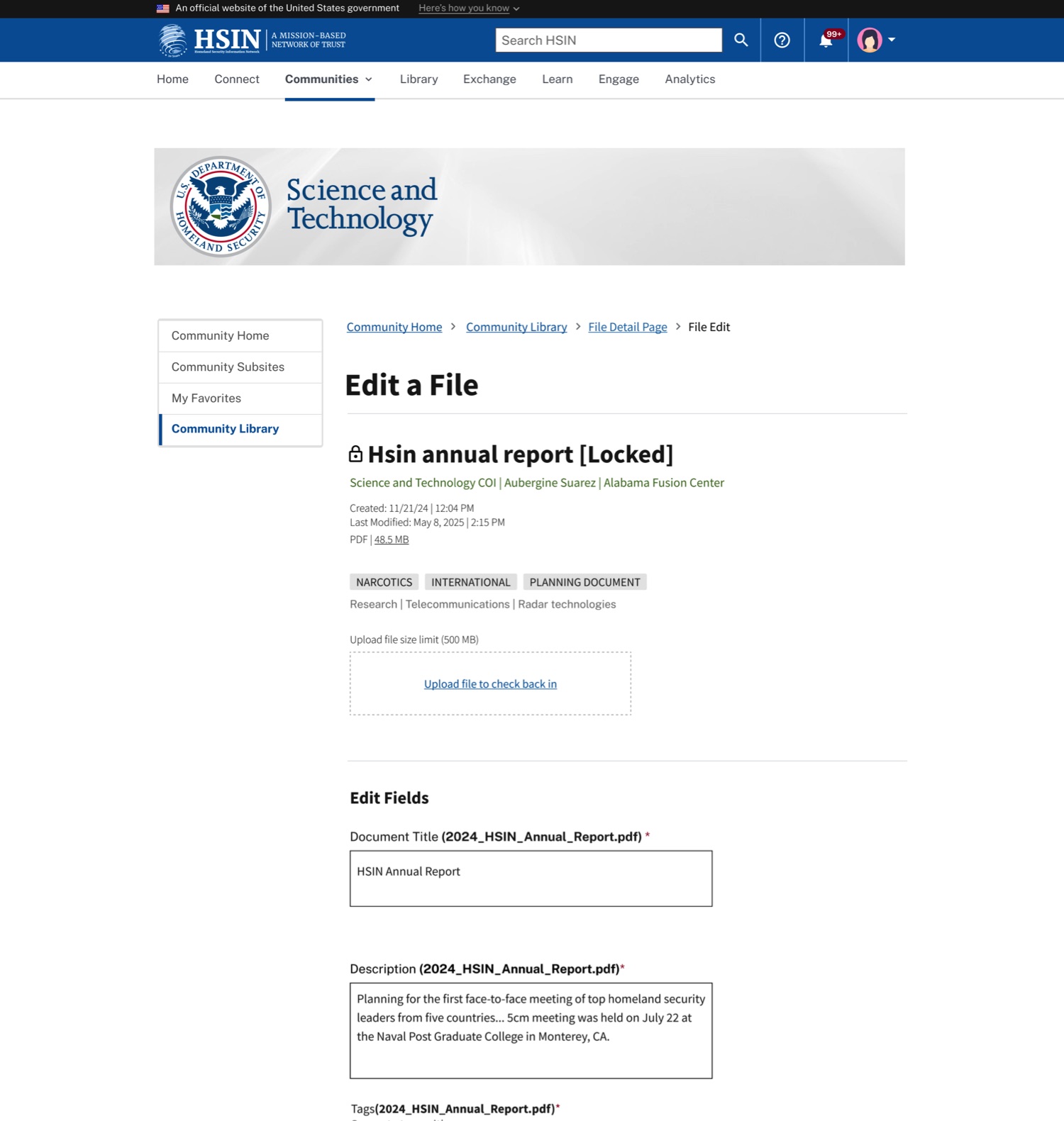
Locking a file to edit it. Left, the page that says what locking will do before you commit. Right, the file once it's locked, with the way to check it back in.
Design
When a rule looks like a bug
On HSIN, what you can see depends on which communities you belong to and what role you hold in each. From the user's chair that can look like a broken site: a document a colleague mentioned isn't in your results, or a button she has isn't on your screen. The demo's search, for example, would list a document from a community you weren't in, then decline to open it.
So I treated permissions as part of the design. For each of the four roles, from visitor to administrator, I worked out what the page shows and which actions it offers, so that a permission rule doesn't come across as a glitch.
Delivery
After handoff
I stayed on through the build. I reviewed what was implemented against the designs, checked it against accessibility requirements, and wrote up the differences. Across more than 1,500 communities, a label that changes between two screens stops being a small thing.
Reflection
Looking back
This was a hard project to keep steady. The scope moved between a migration and a modernization more than once, and priorities shifted with it. I'm proud of how much we got done through those shifts, and that we made the case for users and the business at every point.
The first migration wave launched in early summer 2026 with at least ten test communities, and I don't have adoption results yet. What I can show is how the research shaped the design on the platform DHS selected, and where that platform still falls short.
I'd take more time per session. Each person had five to seven minutes to tell me about their work, and then I walked them through three unfamiliar platforms in under an hour. A lot of my notes end with "not done, out of time." The ratings at the start were the strongest part of the study, and they deserved more room.